Gateways
A gateway is the ingress on one cluster. The page title is Gateways. The subtitle is Ingress gateways that route traffic to your services.
The domain carries the gateway. The endpoint picks that domain. Callers reach the gateway address, and the gateway matches the host and path to an endpoint.
Look before you add one
One External gateway on a cluster can serve every public endpoint on that cluster. Add another only when that cluster has no gateway of the class you need.
- Open Gateways. The search box is Search gateways....
- Use the External row on that cluster when callers are on the internet. Copy that address into the DNS A record.
- Use Internal when traffic should stay inside the cluster.
- New gateway when that cluster has no row of the class you need. Name is required. Cluster is required. Leave Advanced off so Door fills the controller version and the address.
- If New gateway is missing and the page talks about an IP address limit, the organization has reached that plan limit. The message can say IP address limit reached.
Delete opens Delete gateway. When endpoints still use it, the dialog says This gateway is still in use and Remove or reassign these endpoints first, then try again. Delete stays disabled until those endpoints are gone. The cluster cannot be changed later: A gateway's cluster can't change after creation.
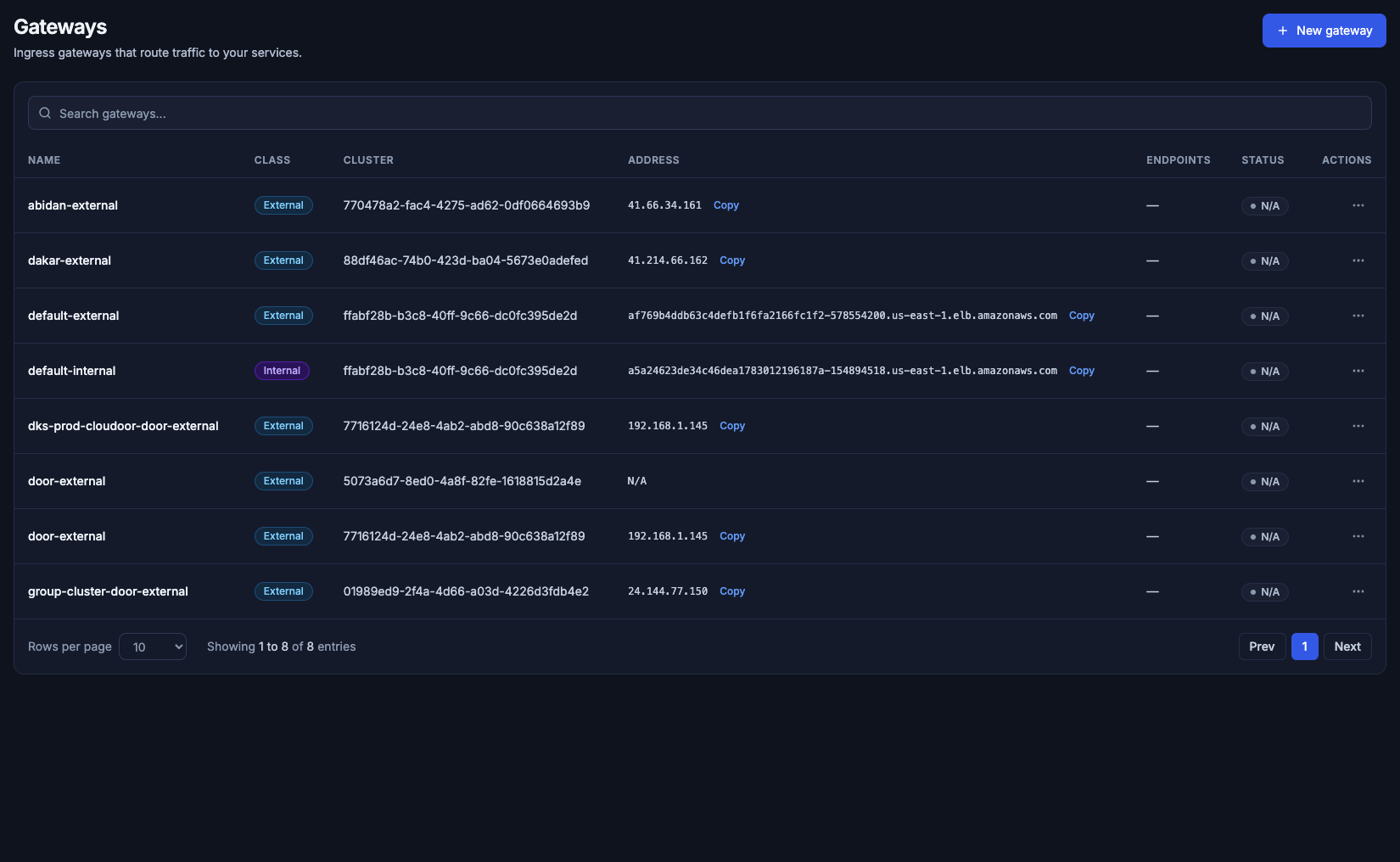
Eight gateways in the default organization. External is the public class. Internal stays inside the cluster. Copy copies the address.
The list
Search is Search gateways.... A search with no hit says No gateways match your search.
| Column | What it shows |
|---|---|
| Name | The gateway name. The row opens the gateway page |
| Class | External or Internal |
| Cluster | The cluster identifier |
| Address | The load balancer address, with Copy. N/A when Door has no address yet |
| Endpoints | A count when the list has it. A dash on this capture still opened a page that listed the attached endpoints |
| Status | N/A on every row in this organization that day |
| Actions | Edit opens this gateway's page. Delete asks you to confirm |
The footer is Rows per page and Showing 1 to 8 of 8 entries.
If the organization has reached its IP address limit, New gateway is replaced by the plan message. The message names the plan and the IP address limit, and offers the upgrade action.
Add gateway
New gateway opens a drawer. The title is Add gateway. The subtitle is A gateway binds an ingress class to a cluster's Envoy load balancer.
The card at the top previews the name. Empty, it reads your-gateway-name, then External · No cluster yet.
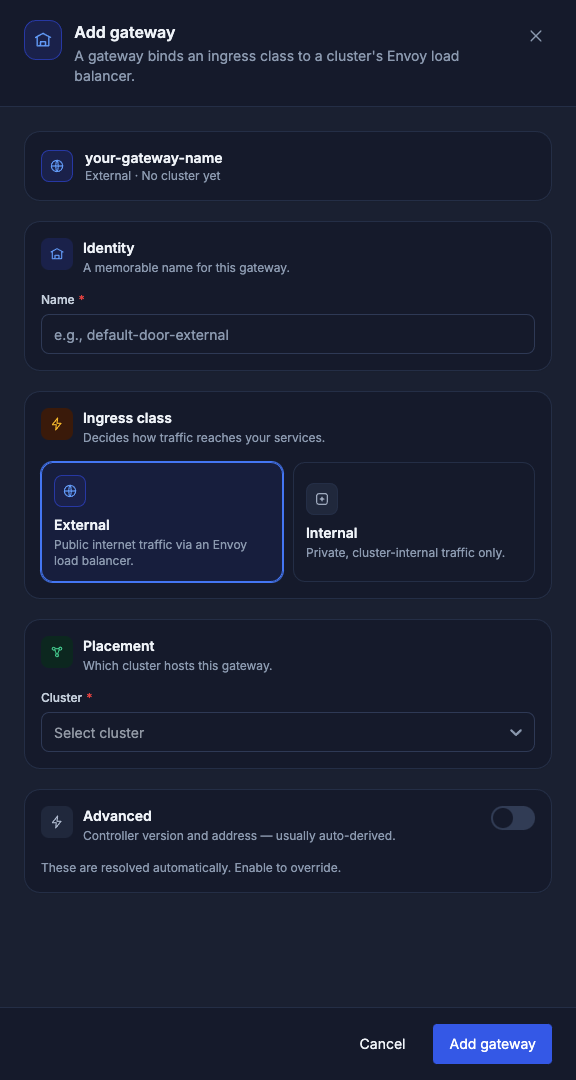
External is selected. Cluster is required. Advanced stays off unless you need to override the version or the address. Cancel closes the drawer.
| Section | Fields |
|---|---|
| Identity | Name, required. Placeholder e.g., default-door-external. The section says A memorable name for this gateway. |
| Ingress class | External — Public internet traffic via an Envoy load balancer. Internal — Private, cluster-internal traffic only. The section says Decides how traffic reaches your services. |
| Placement | Cluster, required, placeholder Select cluster. The section says Which cluster hosts this gateway. |
| Advanced | Off by default. The line is These are resolved automatically. Enable to override. |
The button is Add gateway. An empty name says Name is required. An empty cluster says Select a cluster.
Advanced
Turn Advanced on to set values Door would otherwise fill in. The section says Controller version and address — usually auto-derived.
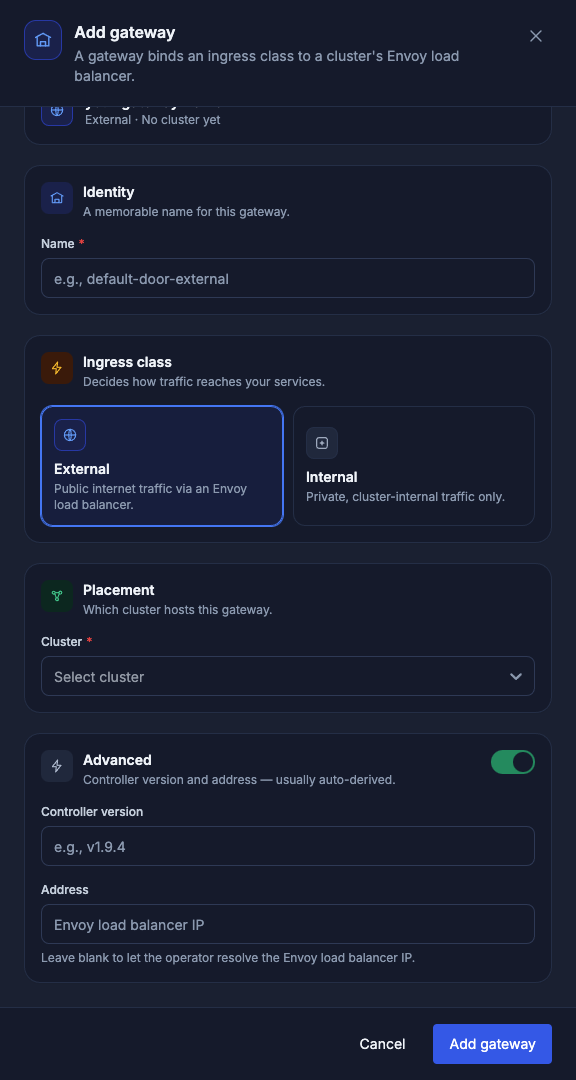
| Field | What you enter |
|---|---|
| Controller version | Optional. Placeholder e.g., v1.9.4 |
| Address | Optional. Placeholder Envoy load balancer IP. The hint is Leave blank to let the operator resolve the Envoy load balancer IP. |
The gateway page
Open a row for the gateway. The subtitle under the name is Contour / Envoy ingress gateway. Edit, Delete, and Back to Gateways sit on the right.
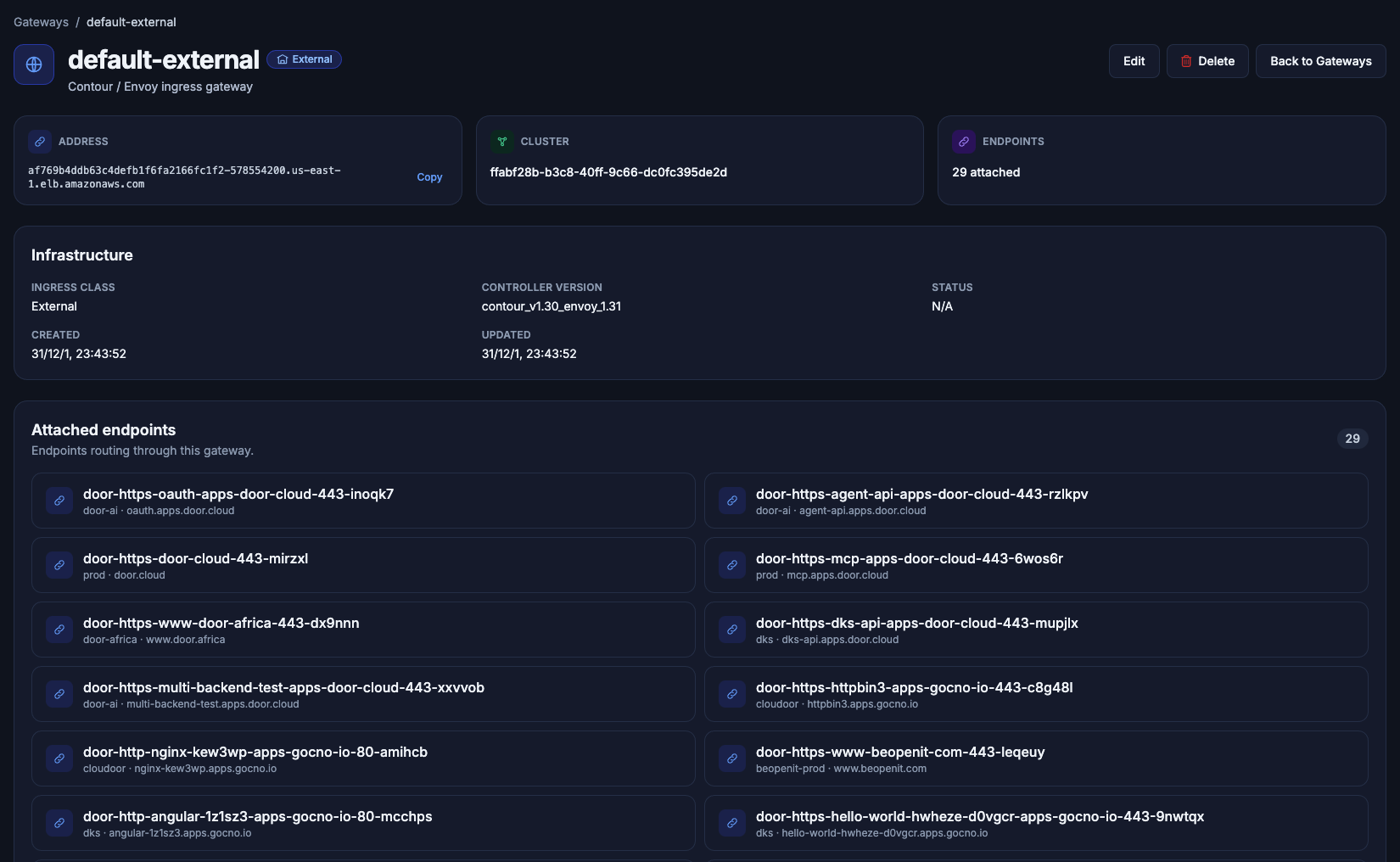
default-external in the default organization. The address is the public load balancer. 29 attached is the endpoint count, and the list below names each one with its project and host.
| Block | What it shows |
|---|---|
| Address | The load balancer hostname or IP, with Copy |
| Cluster | The cluster identifier |
| Endpoints | How many endpoints route through this gateway |
| Ingress class | External or Internal |
| Controller version | The Contour and Envoy version string when Door has one |
| Status | The same status as the list |
| Created and Updated | Timestamps |
Attached endpoints is subtitled Endpoints routing through this gateway. Each row is the endpoint name, then the project and the host. An empty gateway says No endpoints are using this gateway yet.
Edit
Edit on the gateway page opens the same drawer, titled Edit gateway. The placement line changes to A gateway's cluster can't change after creation. The cluster field is locked. The class cards stay available. The button is Save changes. Edit in the list opens this page first.
Delete
Delete opens Delete gateway. The body is: Are you sure you want to delete {name}? This action cannot be undone.
If endpoints still use the gateway, the dialog adds This gateway is still in use and Remove or reassign these endpoints first, then try again: followed by up to five endpoint names and, when there are more, …and {n} more. Delete stays disabled until those endpoints are gone. Cancel closes the dialog. While a delete runs, the button reads Deleting….