Endpoints
An endpoint is one public host and path, and the service that answers it. The page title is Endpoints. The subtitle is Manage your endpoints.
The endpoint belongs to an environment. The environment is the one behind the domain you pick. Creating the environment is Door Hub. The service inside it may be an application from Door DevOps, or any other address you name.
Create the domain before the endpoint. The drawer cannot offer a host that is not on Domains. DNS for that host points at the gateway address. The full order is on Publish one service.
Two creates
In-cluster service is the one you want when Door DevOps, or anything else, already runs in the environment. Service lists names in that namespace after the domain is chosen. Until then the hint is Choose a domain (and environment) first to list services. Port starts at 8080. Set the port the process listens on, the same port you set on the application.
External URL is the one you want when the process is not in the cluster. You enter Scheme, Host or IP, and Port. The public host is still the Door domain. Callers hit your domain, and Door forwards to that external host.
Leave Health check off until the route answers. Then turn it on if you want Door to probe the backend. The path starts at /healthy, with the counts at 3.
Advanced — protocol & port can stay closed. A secure domain already starts on HTTPS and 443. Open it for gRPC, TCP, or a different listener port.
Add backend is for a split across several targets. One backend is enough for the first endpoint. Weights are edited later, on Traffic Policy, and online weights must add up to 100%.
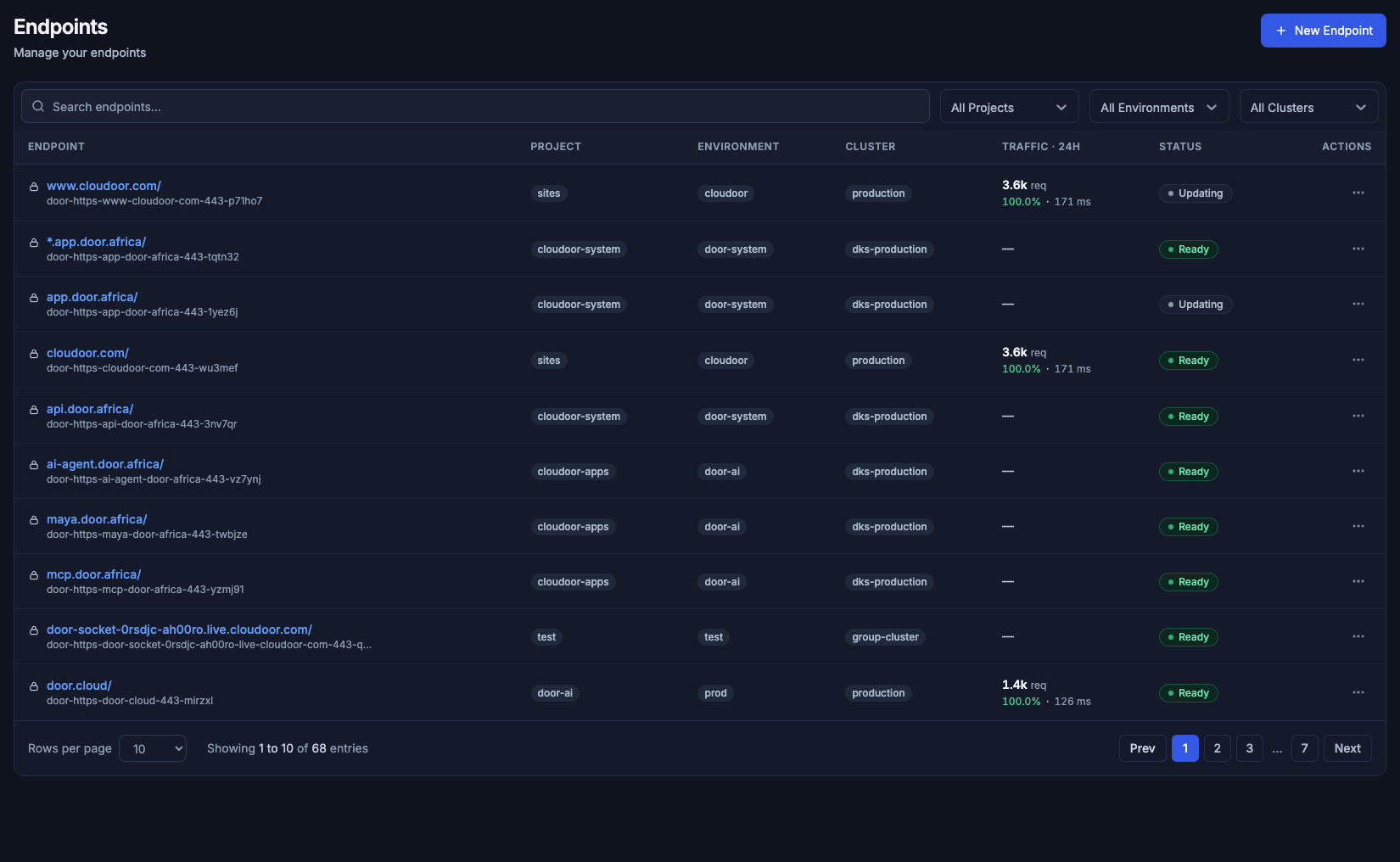
Endpoints in the default organization. New Endpoint opens the create drawer. The list that day had 68 entries.
The list
Search is Search endpoints.... The filters are All Projects, All Environments, and All Clusters.
| Column | What it shows |
|---|---|
| Endpoint | The public host and path, and the generated name under it |
| Project | The project that owns the environment |
| Environment | The environment the endpoint runs in |
| Cluster | The cluster that environment is on |
| Traffic · 24h | Requests, success rate, and average latency for the last 24 hours. An em dash means no traffic in that window |
| Status | Ready or Updating are the values this organization showed |
| Actions | View & edit and Delete |
The footer is Rows per page and Showing 1 to 10 of 68 entries, with Prev and Next. A search with no hit says No endpoints match your search.
Open a row to land on the endpoint. The address looks like /api-management/endpoints/{environment}/{endpoint}.
New Endpoint
New Endpoint opens a drawer. The title is New endpoint. The subtitle is Expose a service on one of your registered domains.
The drawer starts by loading gateways and environments. That line reads Loading gateways and environments…. If the load fails, the alert is Couldn't load endpoint options, with Retry. If the organization has no domains yet, the domain field says No domains registered yet. A search with no hit says No domains match your search.
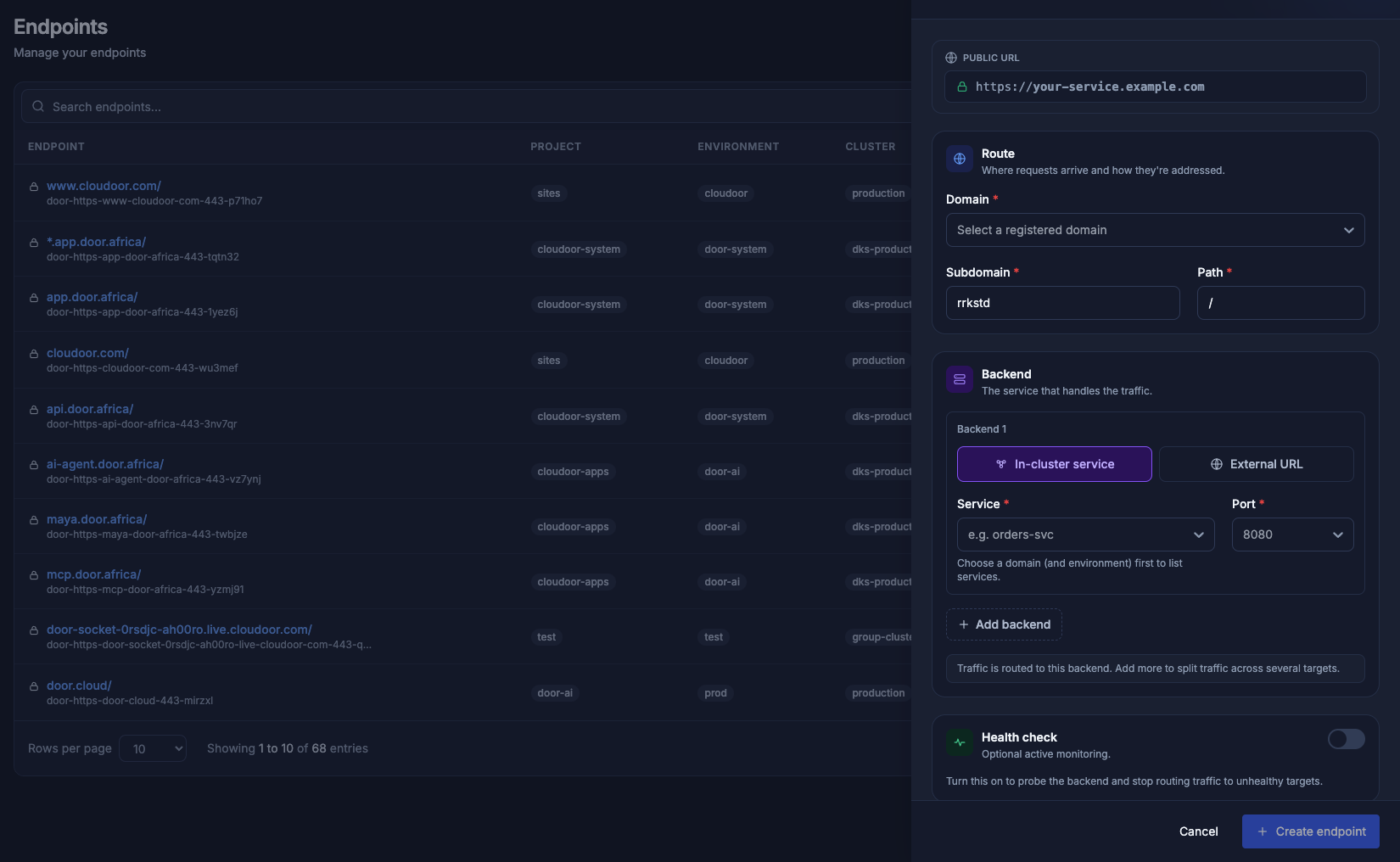
Route picks the domain, subdomain, and path. Backend is an in-cluster service until you switch it. Create endpoint saves. Cancel closes the drawer and saves nothing.
Route
Route is subtitled Where requests arrive and how they're addressed.
| Field | What you enter |
|---|---|
| Domain | Select a registered domain. Required. A domain tied to one environment also selects that environment. The line then reads Deploys to {environment} |
| Subdomain | Required. The placeholder is orders. Door fills in a short value you can replace |
| Path | Required. It starts at / |
| Environment | Shown when the domain covers a whole cluster. The hint is This domain serves a whole cluster — pick where the endpoint runs. Placeholder Select environment, or None in this cluster when that cluster has no environment |
| Gateway | Shown when the domain is not already bound to one. The hint is This domain isn't bound to a gateway — choose one to serve it. Placeholder Select gateway. The line then reads Served by {gateway}, or via {gateway} when the environment is already named |
Public URL at the top of the drawer is the address callers will use. It stays on the example https://your-service.example.com until a domain is selected.
Once a domain is selected, Advanced — protocol & port opens Protocol (HTTPS, HTTP, gRPC, TCP) and Listener port (placeholder 443). HTTPS and port 443 are the starting values. A domain saved as Not Secure starts on HTTP and port 80.
The console refuses the create with these messages when a field is empty:
| Message | What is missing |
|---|---|
| Subdomain / host is required. | Subdomain |
| Path is required. | Path |
| Select a domain for this endpoint. | Domain, before the other checks |
| Select an environment for this endpoint. | The environment picker |
| Select a gateway for this endpoint. | The gateway picker |
| Gateway is required. | A domain whose gateway Door can resolve |
| Environment is required. | The environment behind that domain |
| Protocol is required. | The scheme Door derives for the route |
| Endpoint name could not be derived; provide a name. | Door could not build the endpoint name from the host |
Backend
Backend is subtitled The service that handles the traffic. The first block is Backend 1.
In-cluster service is the default. Service lists services in the environment once a domain is chosen. Until then the hint is Choose a domain (and environment) first to list services. The placeholder is e.g. orders-svc. Port defaults to 8080.
External URL replaces the service with three fields: Scheme (default https), Host or IP (placeholder api.example.com or 10.0.0.5), and Port (placeholder 443).
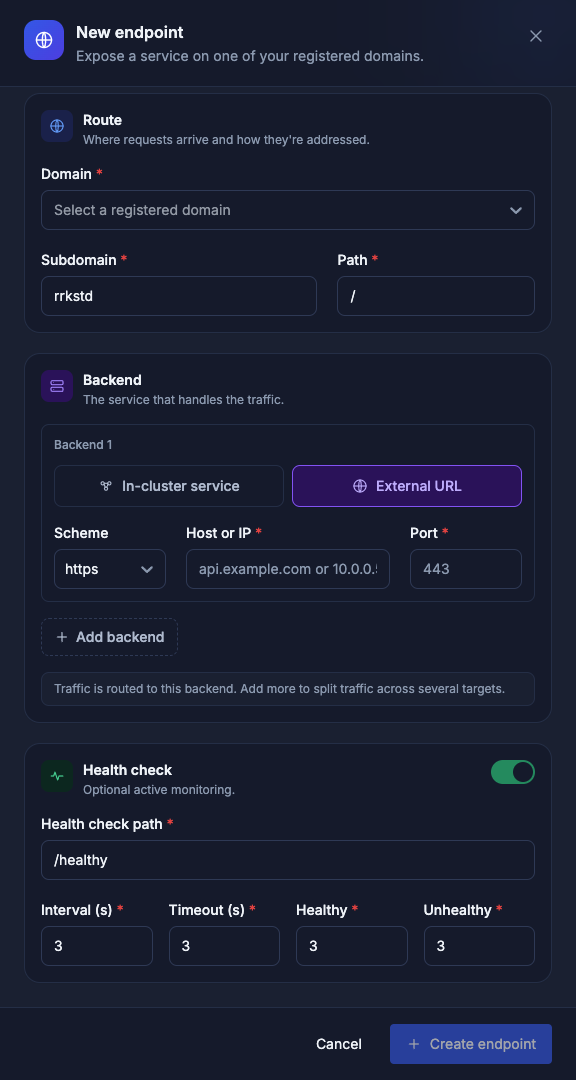
External URL sends traffic to a host outside the cluster. The health check is optional and off until you turn it on.
Add backend adds another target. With one backend the note says: Traffic is routed to this backend. Add more to split traffic across several targets. With several it says: Traffic is split evenly across the backends. You can fine-tune the weights after the endpoint is created.
| Message | What is missing |
|---|---|
| Backend service is required. | In-cluster service name |
| Backend host or IP is required. | External host |
| Backend service port must be a positive number. | Port |
| Port must be a positive number. | Port on the route |
The button is Create endpoint.
Health check
Health check is subtitled Optional active monitoring. The switch starts off. The line under it says: Turn this on to probe the backend and stop routing traffic to unhealthy targets.
When the switch is on, the fields are:
| Field | Default |
|---|---|
| Health check path | /healthy |
| Interval (s) | 3 |
| Timeout (s) | 3 |
| Healthy | 3 |
| Unhealthy | 3 |
All five are required once the check is on. The messages are Health check path is required., Health check interval must be a positive number., Health check timeout must be a positive number., Healthy threshold count must be a positive number., and Unhealthy threshold count must be a positive number.
The endpoint page
The header shows the generated name, the status, and the public URL. View app and Analyze with Maya sit with Edit, Delete, and Back to Endpoints. View & edit on the list opens this page. Edit on this page switches to Traffic Policy.
When the endpoint is tied to an application, Source application names that application and its environment, with View app →.
Three tabs follow: Overview, Traffic Policy, and Security Policy.
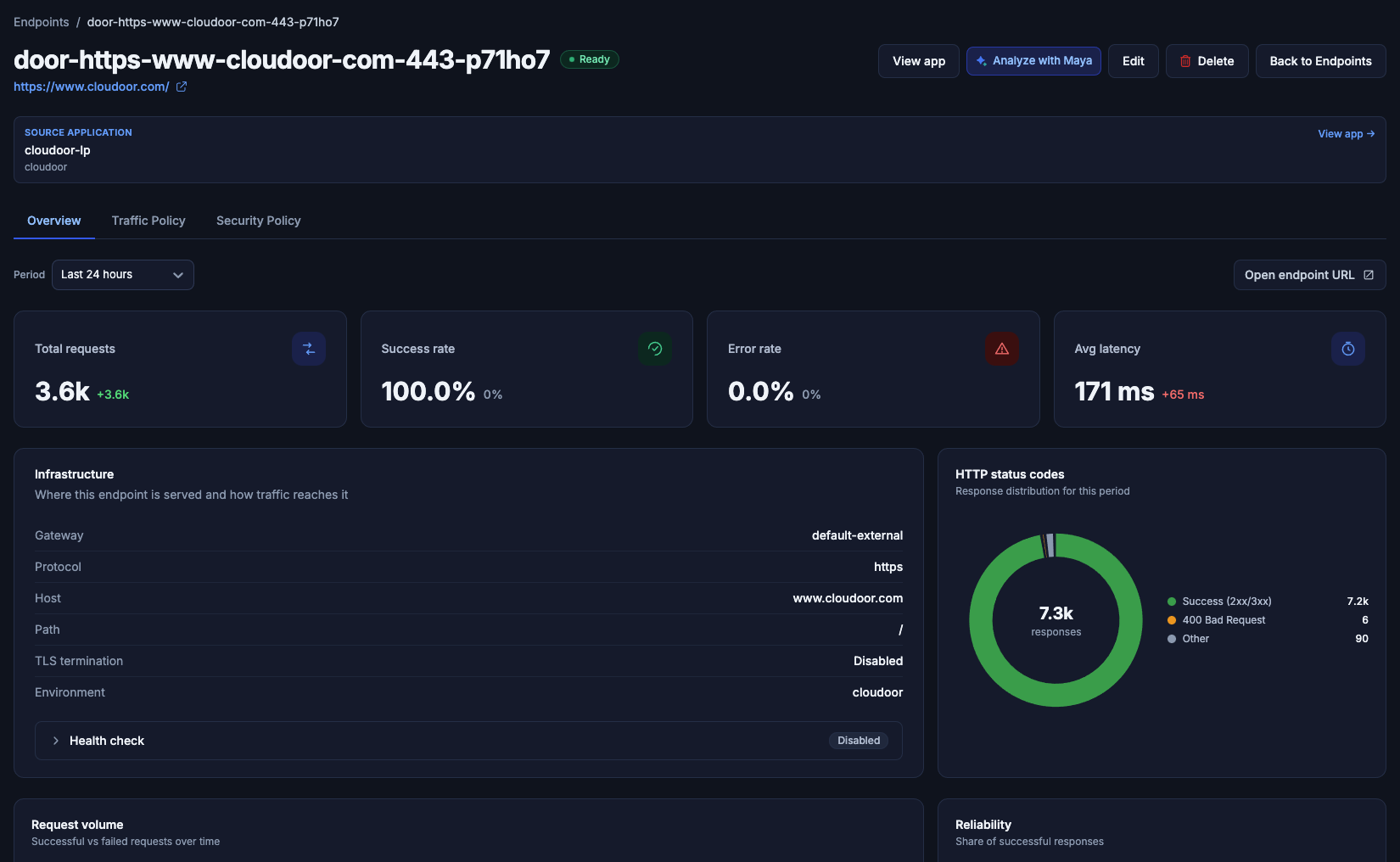
The endpoint for https://www.cloudoor.com/ in the default organization. Source application is the Door DevOps application. Infrastructure names the gateway, host, path, and environment.
Overview tab
Period works the same way as on the organization Overview. The default is Last 24 hours. Open endpoint URL opens the public address.
The figures are Total requests, Success rate, Error rate, and Avg latency, each with the change for the period.
Infrastructure is subtitled Where this endpoint is served and how traffic reaches it.
| Row | What it shows |
|---|---|
| Gateway | The gateway that received the request, for example default-external |
| Protocol | https on this endpoint |
| Host | The public host |
| Path | The public path |
| TLS termination | Disabled on this endpoint. TLS for the hostname is also described on the domain and on the gateway |
| Environment | The environment name |
| Health check | Disabled, or the probe you configured |
HTTP status codes is subtitled Response distribution for this period. It splits Success (2xx/3xx), individual codes such as 400 Bad Request, and Other.
Below that, the same page repeats Request volume, Reliability, and Latency for this endpoint only, then Backends with per-target latency, requests, and status codes.
Traffic Policy
Traffic Policy decides which backend receives a request.
When Door already manages the route for a deployment strategy, the tab shows Managed traffic policy: This endpoint uses a managed deployment strategy. Traffic routing is controlled by Door CD and cannot be edited here.
The three counts are Conditional routes, Fallback route, and Backends total. The banner says: Requests are checked against conditional routes top to bottom — the first match wins. Anything that matches nothing falls through to the fallback route below.
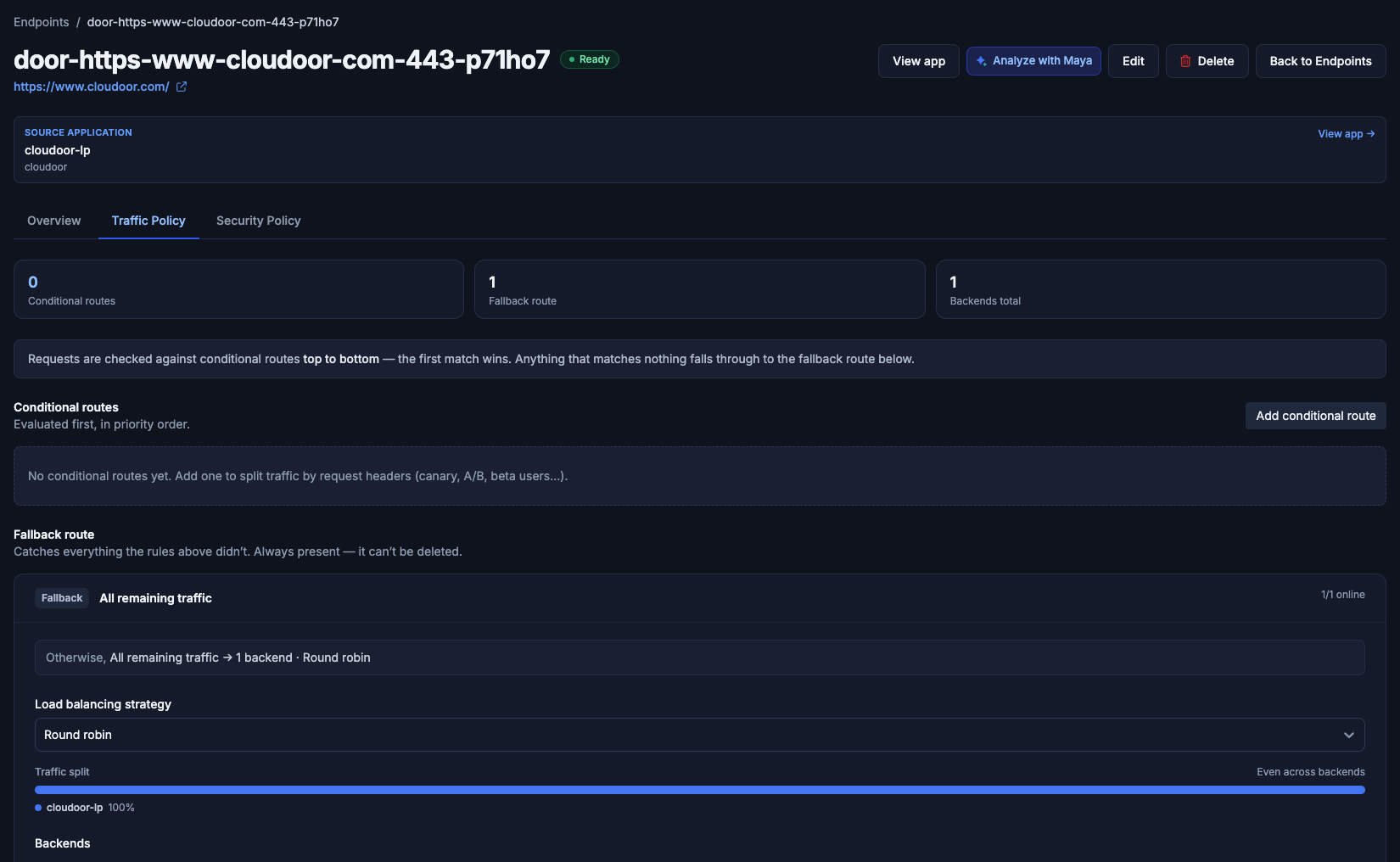
A new endpoint has no conditional routes. The fallback is always there. Round robin is the load balancing strategy, and the bar reads Even across backends.
Conditional routes
Conditional routes is subtitled Evaluated first, in priority order. Add conditional route inserts Priority 1 and a route named from the placeholder beta-users. The empty state before that is: No conditional routes yet. Add one to split traffic by request headers (canary, A/B, beta users…).
Each route has:
| Field | What you enter |
|---|---|
| Route name | A name for the condition. Empty, the page says Condition name is required. |
| Header name and Header value | A request header that must match. The placeholders are x-route-version and beta |
| Add header match | Another header that must also match |
| Load balancing strategy | Same choices as the fallback |
| Backends | The targets for this condition |
The summary line before any header is set reads When no condition set → 1 backend · Round robin. Delete removes that conditional route.
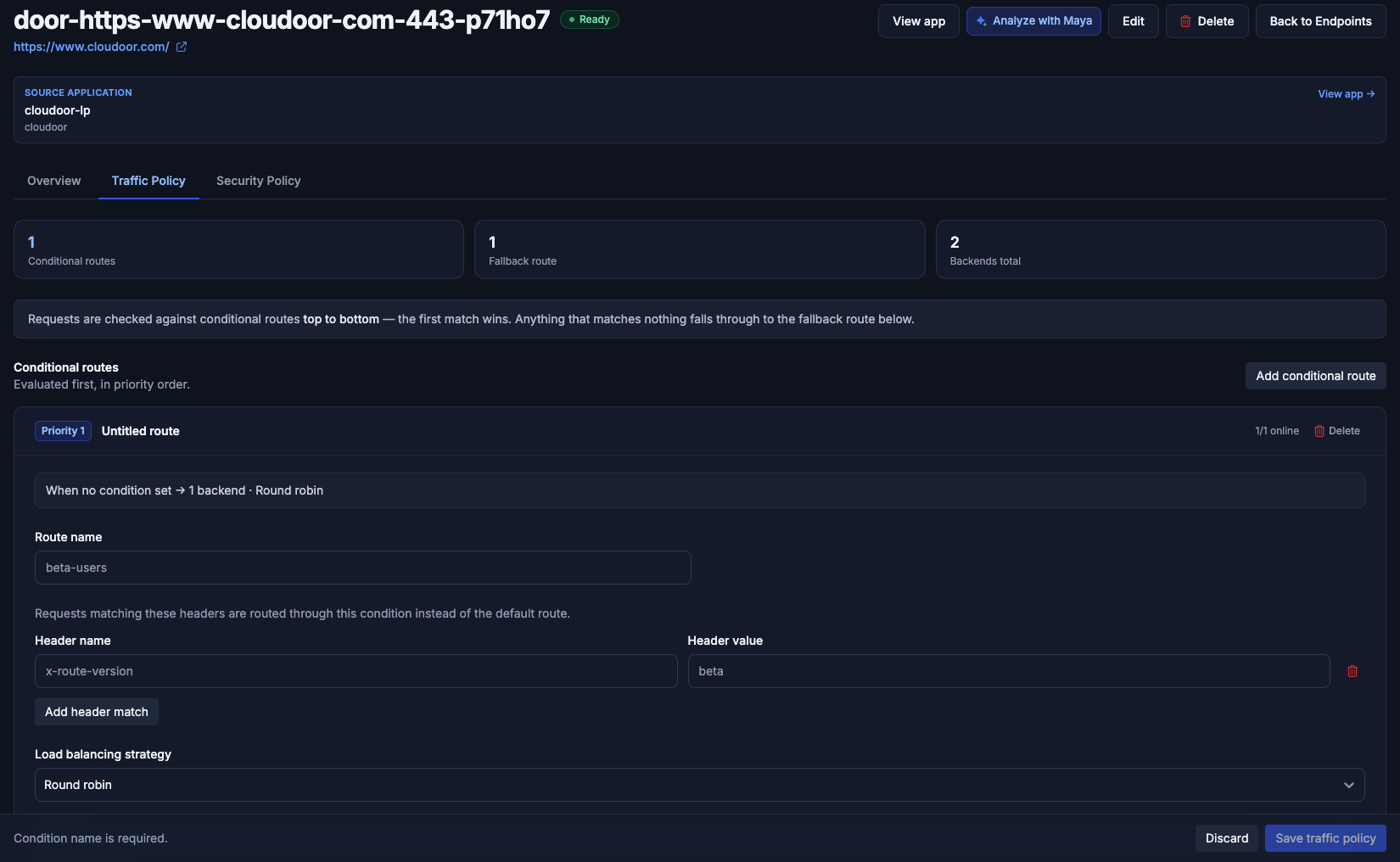
The route is local until you press Save traffic policy. Discard throws the unsaved route away. The fallback underneath is unchanged.
Fallback route
Fallback route is subtitled Catches everything the rules above didn't. Always present — it can't be deleted. The badge is Fallback and the title is All remaining traffic. The summary reads Otherwise, All remaining traffic → 1 backend · Round robin, with 1/1 online when the only backend is online.
Load balancing
Load balancing strategy offers:
| Strategy | How the split is shown |
|---|---|
| Round robin | Even across backends |
| Random | Even across backends |
| Cookie | Even across backends |
| Canary | By weight, and each backend gains Weight (%). Online weights must add up to 100%. The page says Backend weights for online targets must sum to 100%. |
| Weighted least request | By weight, with the same Weight (%) rule |
Backends on a route
Each backend shows its name, In-cluster · port {n} or the external host, a Remove button, and an Offline / Online switch. Add backend opens New backend:
| Choice | Fields |
|---|---|
| In-cluster service | Service (placeholder Search services… or e.g. orders-svc) and Port (placeholder 8080). An empty list says No services found — type a name. Typing a name offers Use "{name}" |
| External host | Host or IP (placeholder api.example.com or 10.0.0.5) and Port |
Add to route keeps the backend on the unsaved policy. Cancel closes the form.
Resilience and headers
Resilience & headers starts collapsed. The summary on the right reads no retries · no timeout · 0 headers when nothing is set.
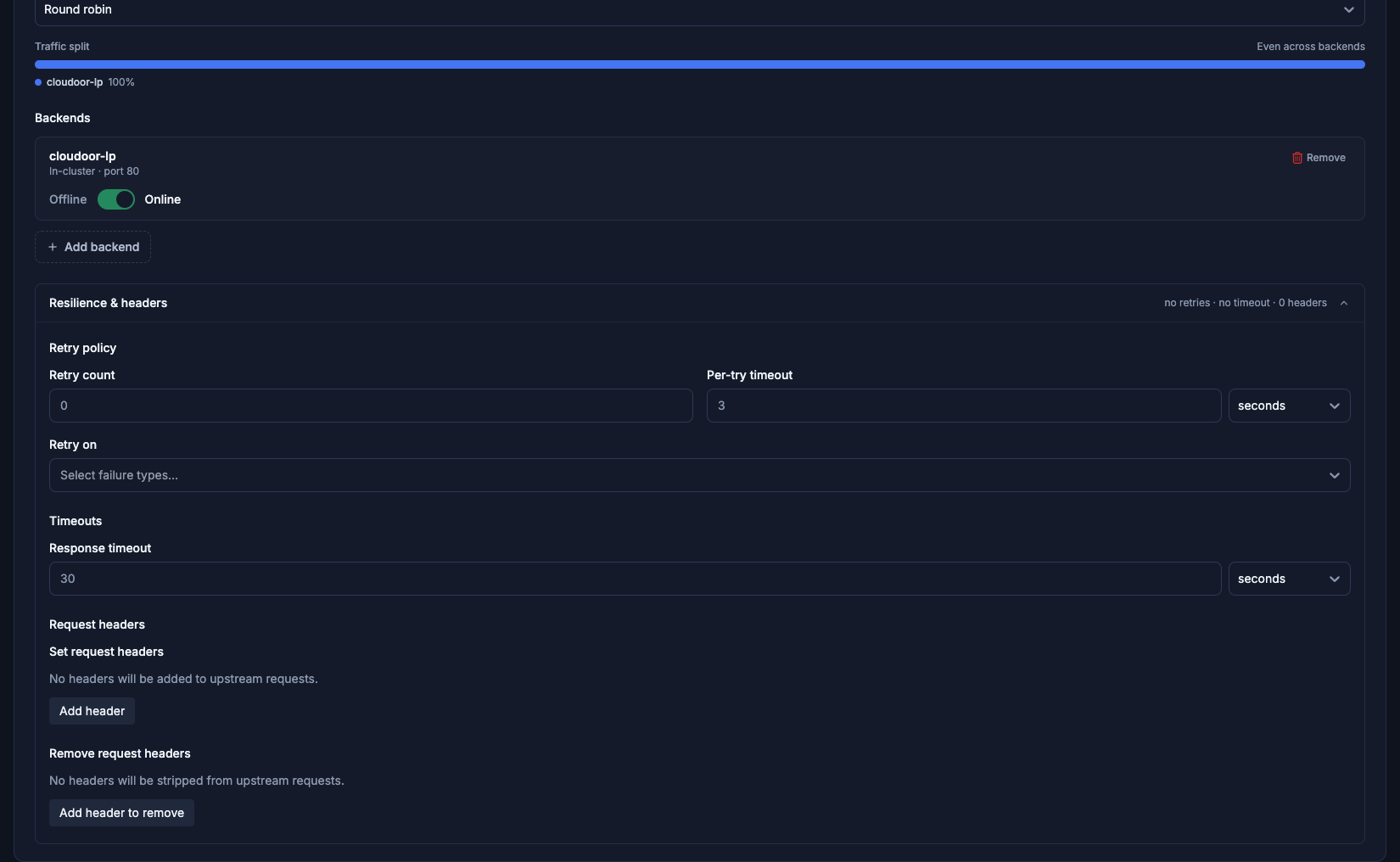
Opened on the fallback of www.cloudoor.com. Retry count is 0, per-try timeout is 3 seconds, response timeout is 30 seconds.
| Group | Fields |
|---|---|
| Retry policy | Retry count, Per-try timeout in seconds or milliseconds, and Retry on |
| Timeouts | Response timeout, in seconds or milliseconds |
| Set request headers | Header name (placeholder x-request-id) and Header value (placeholder abc-123). Add header. Empty, the line is No headers will be added to upstream requests. |
| Remove request headers | Header 1 (placeholder x-envoy-internal). Add header to remove. Empty, the line is No headers will be stripped from upstream requests. |
Retry on is a multi-select, placeholder Select failure types…. The values are 5xx, gateway-error, reset, and connect-failure.
Nothing on this tab is stored until Save traffic policy. Discard restores the last saved policy. Both buttons appear after a change.
Security Policy
Security Policy is the third tab. The header counts Protections active out of 4, then Edge for TLS termination, and Authentication as Open when no auth server is attached.
Request gauntlet reads: Every request passes left → right. Dimmed gates are off. The stages are Client, TLS (Edge), IP filter, Auth, Path rules, Rate limit, and Backend.
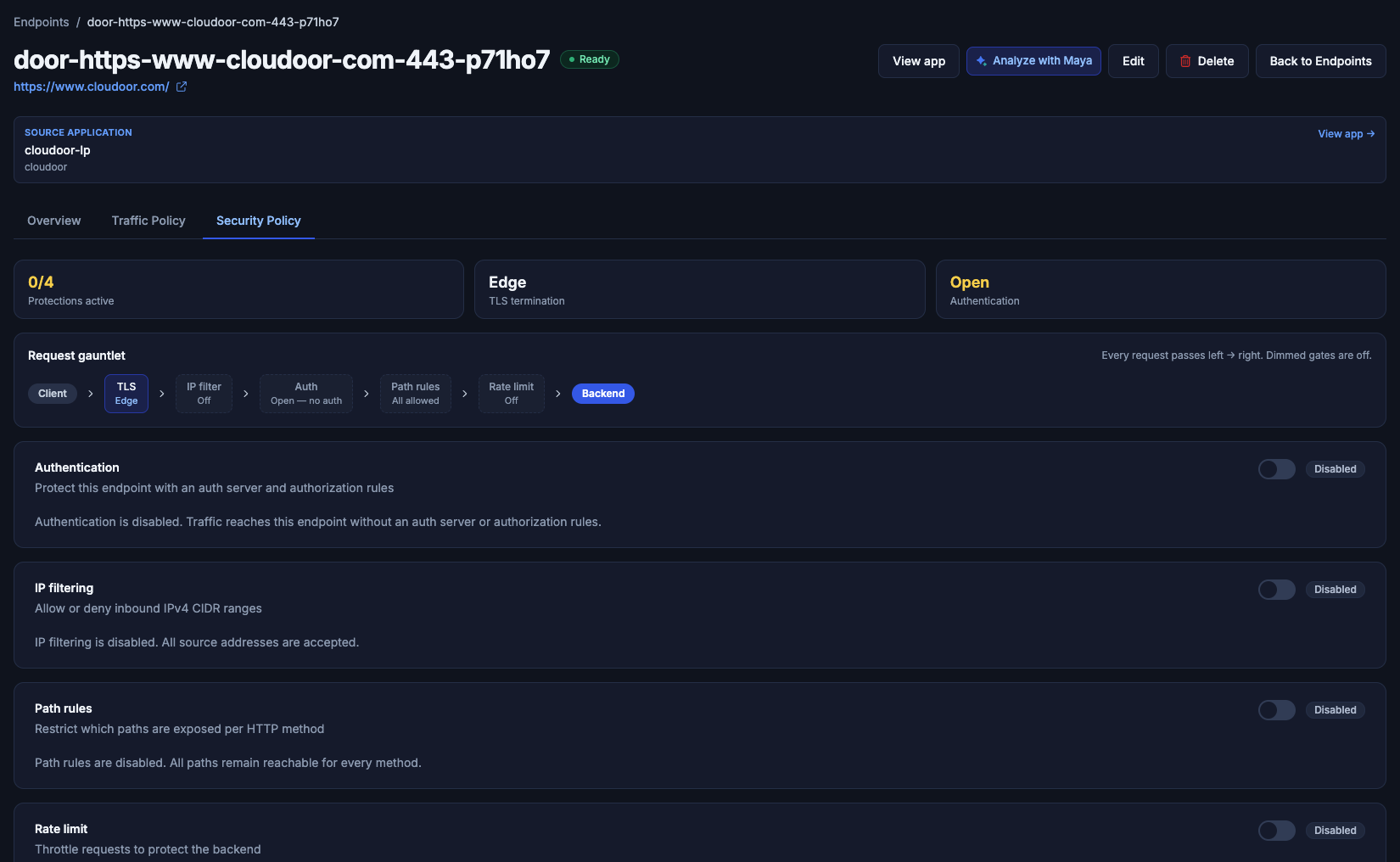
On this endpoint every gate is off: 0/4 protections, authentication Open — no auth, path rules All allowed, IP filter and rate limit Off.
Each section has a switch. A change is local until Save security policy. Discard restores the saved policy.
Authentication
Authentication is subtitled Protect this endpoint with an auth server and authorization rules. Off, the text is: Authentication is disabled. Traffic reaches this endpoint without an auth server or authorization rules.
On, you pick Auth server. The list is the auth servers in the organization. If there are none, the picker says No auth servers found for this organization. Create one first. See Auth servers.
Authorization rules then limit who can call which path. Add rule adds a rule with:
| Field | Values |
|---|---|
| HTTP methods | GET, POST, PUT, DELETE, PATCH, HEAD |
| Paths | One path per line. Placeholder /orders and /orders/* |
| Permission type | Roles, Groups, Required roles, Required groups |
| Permissions | One value per line. Placeholder admin and orders:read |
Advanced JSON import/export holds the same rules as JSON. Export current rules fills the box. Import JSON reads it back. The sample in the box uses the key permisionType, spelled that way. A rule that misses a field says: Each rule must include methods, paths, permisionType, and permissions.
IP filtering
IP filtering is subtitled Allow or deny inbound IPv4 CIDR ranges. Off: IP filtering is disabled. All source addresses are accepted.
On, the note is: Mix allow and deny rules as needed. When both apply, deny takes precedence. An empty list says No IP rules yet. Add your first allow or deny entry. Add IP rule adds a row with Allow or Deny, and IPv4 CIDR (placeholder 10.0.0.0/8).
Path rules
Path rules is subtitled Restrict which paths are exposed per HTTP method. Off: Path rules are disabled. All paths remain reachable for every method.
On, each method has its own box: GET, POST, PUT, DELETE, PATCH, and HEAD. One path per line. The placeholder is /orders and /orders/*.
Rate limit
Rate limit is subtitled Throttle requests to protect the backend. Off: Rate limiting is disabled. No request throttle is applied.
On, Requests (placeholder e.g., 100) and Unit. The units are Per second, Per minute, and Per hour. The unit starts at Per minute.
CORS and gateway JWT
CORS is subtitled Cross-origin resource sharing for browser clients. The console states: CORS configuration is not supported by the endpoint API yet. This section will let you manage allowed origins, methods, and headers once backend support ships.
JWT verification (gateway) is subtitled Gateway-level JWT validation settings, and marked Coming soon. The console states: Gateway JWT verification cannot be edited in the console yet. When present on the endpoint, a read-only summary is shown below. With nothing configured, the line is No JWT provider is configured on this endpoint. When a provider is present, the read-only row is Current provider.
Delete
Delete on the row or on the endpoint page opens Delete endpoint. The body is: Are you sure you want to delete {name}? This action cannot be undone. Cancel closes it. Delete removes the endpoint. While it runs, the button reads Deleting….