Auth servers
An auth server is the login method an endpoint can require. The sidebar label is AuthServer. The page title is Auth servers. The subtitle is Protect your endpoints with OIDC, basic auth, or static tokens.
An auth server lives on one environment. The endpoint that uses it is on an environment too. Turn it on from the endpoint's Security Policy, under Authentication. See Endpoints.
Add it after the endpoint answers
Prove the route with Authentication off. Then:
- New auth server on the same environment as the endpoint. The environment cannot be changed later.
- Pick one provider. OIDC for an external login (issuer, client id, client secret, scopes). Basic for a username and password, with a realm. Token for a static bearer token callers send. The type cannot be changed later, and Name cannot either: The name can't change after creation.
- Open the endpoint, Security Policy, and set Auth server to the one you just saved. Save security policy.
- Call the URL without a credential and confirm the gateway challenges. Then call it with the credential.
JWT verification (gateway) carries the badge Coming soon. The line under it says Gateway JWT verification cannot be edited in the console yet. CORS says CORS configuration is not supported by the endpoint API yet. IP allow and deny lists, path rules, and the rate limit are on the same policy and work independently of the auth server.
One auth server can be selected by several endpoints on that environment. An endpoint on another environment needs an auth server on that other environment.
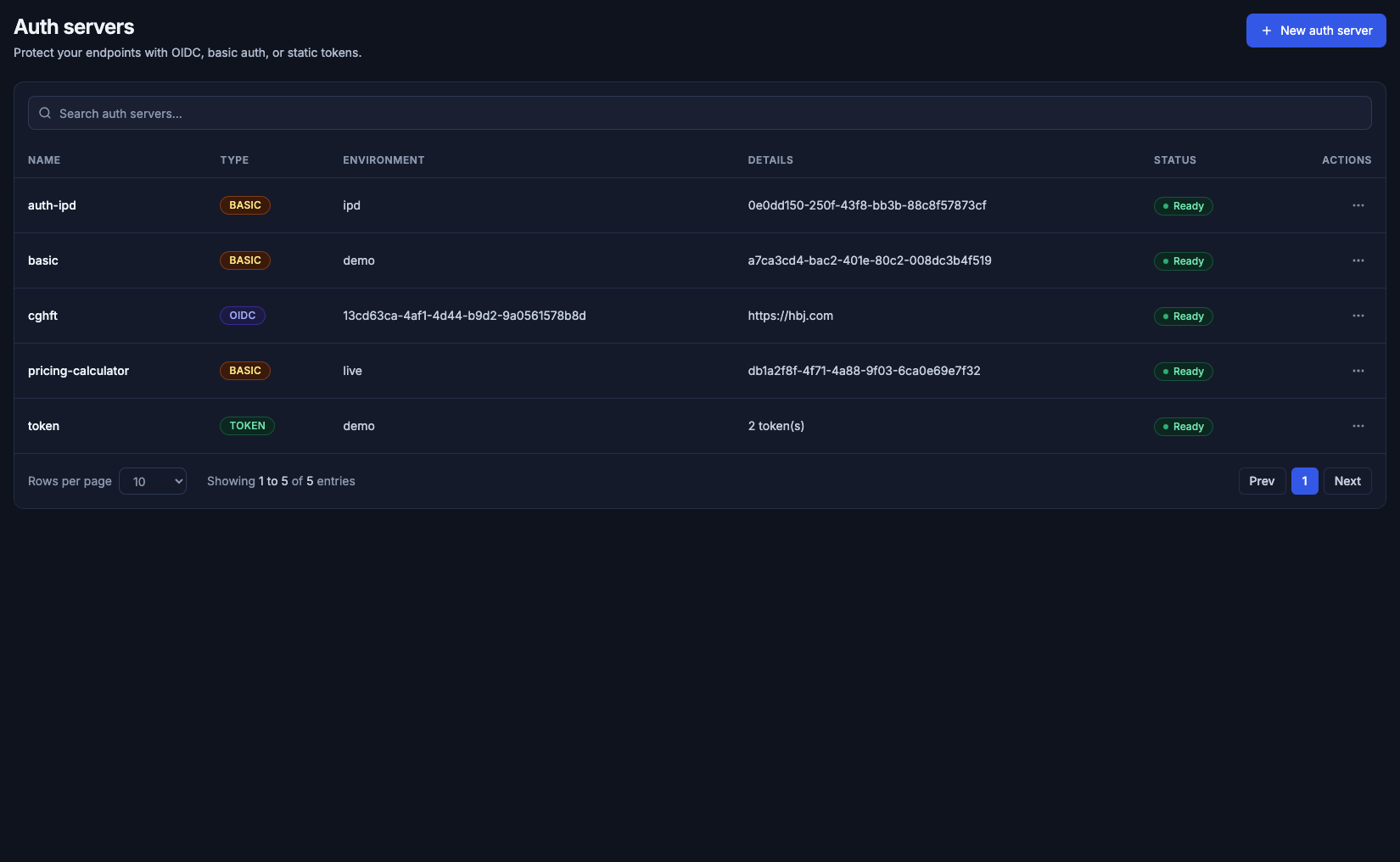
Five auth servers in the default organization. Basic, OIDC, and Token are the three types. Details shows an issuer URL for OIDC and a token count for Token.
The list
Search is Search auth servers.... A search with no hit says No auth servers match your search.
| Column | What it shows |
|---|---|
| Name | The auth server name. The row opens the auth server page |
| Type | Basic, OIDC, or Token |
| Environment | The environment name. When Door can no longer resolve that environment, this cell shows the environment identifier |
| Details | OIDC shows the issuer URL. Token shows {n} token(s). Basic shows an identifier |
| Status | Ready on every row in this organization that day |
| Actions | Edit and Delete |
The footer is Rows per page and Showing 1 to 5 of 5 entries.
Add auth server
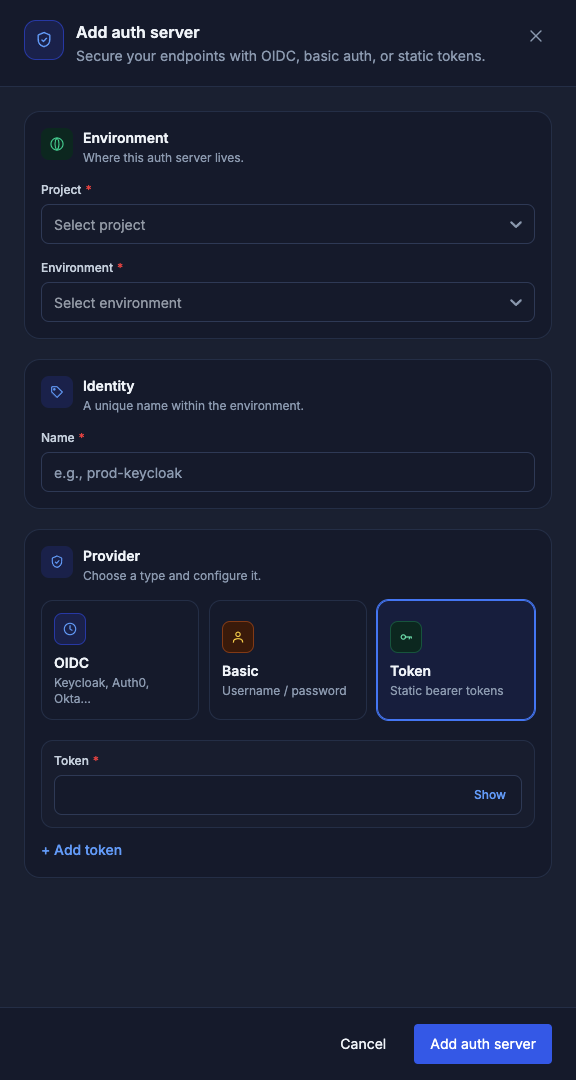
New auth server opens a drawer. The title is Add auth server. The subtitle is Secure your endpoints with OIDC, basic auth, or static tokens.
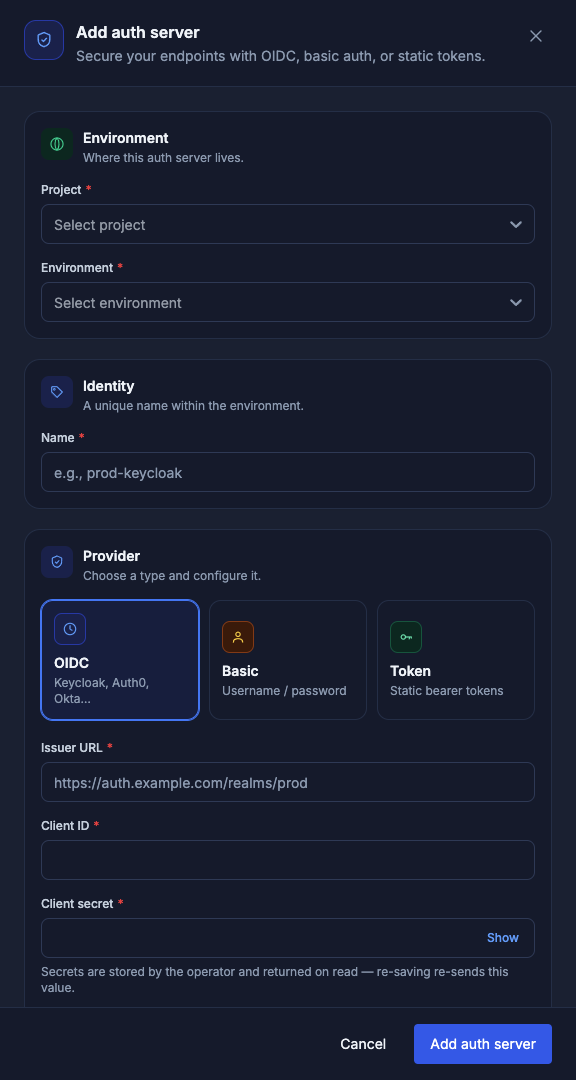
The auth server is created on a project and an environment. OIDC is the type that opens first. Cancel closes the drawer and saves nothing.
Environment and name
Environment is subtitled Where this auth server lives.
| Field | What you enter |
|---|---|
| Project | Required. Placeholder Select project |
| Environment | Required. Placeholder Select environment. It lists environments of the project you picked |
Identity is subtitled A unique name within the environment. Name is required. The placeholder is e.g., prod-keycloak.
Provider
Provider is subtitled Choose a type and configure it.
| Type | Blurb on the card |
|---|---|
| OIDC | Keycloak, Auth0, Okta… |
| Basic | Username / password |
| Token | Static bearer tokens |
The button is Add auth server.
OIDC
| Field | What you enter |
|---|---|
| Issuer URL | Required. Placeholder https://auth.example.com/realms/prod. Empty, the message is Issuer URL is required for OIDC auth servers. |
| Client ID | Required. Empty, the message is Client ID is required for OIDC auth servers. |
| Client secret | Required until you tick the public-client box. Show reveals the value. The hint is Secrets are stored by the operator and returned on read — re-saving re-sends this value. |
| Allow empty client secret (public clients) | Leaves the secret empty for a public client |
| Scopes | Optional. Placeholder openid profile email |
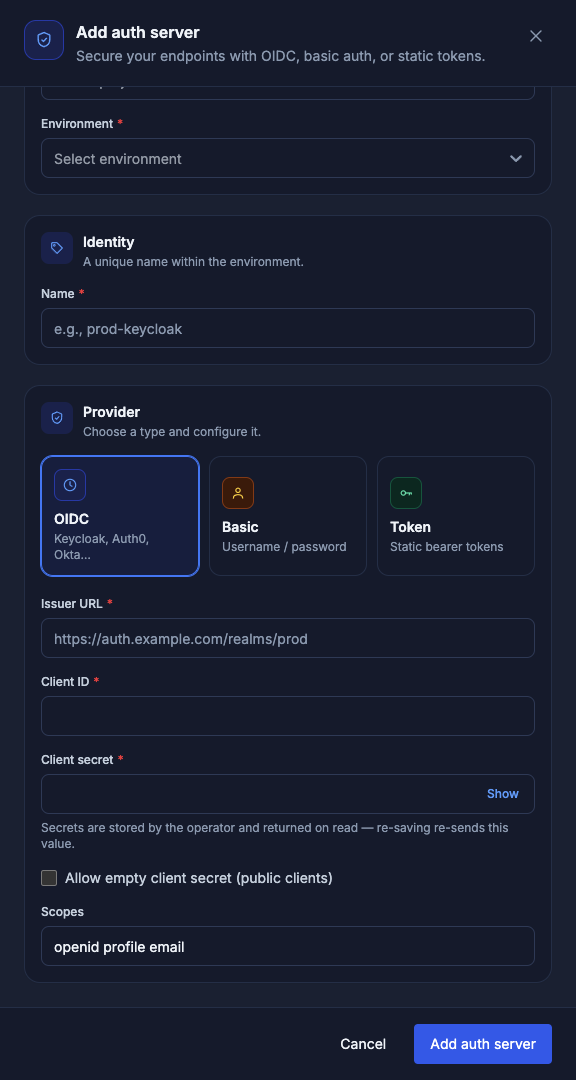
Scopes are a single line. The secret field stays masked until Show.
Basic
Realm is optional. Placeholder e.g., Restricted area. The hint is Shown in the browser's basic-auth prompt.
Each credential has Username and Password, both required. Show reveals the password. + Add credential adds another pair.
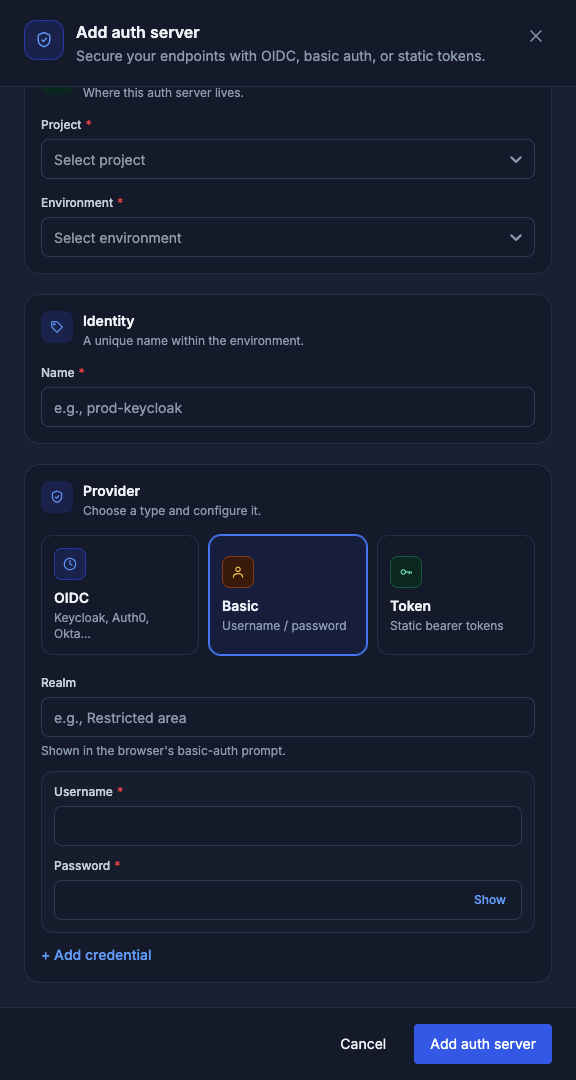
Token
Each entry is Token, required. Show reveals it. + Add token adds another. The list and the detail page show a count, and the detail page masks the value.
The auth server page
Open a row for the auth server. The line under the name is Endpoint authentication provider. Edit, Delete, and Back to Auth servers sit on the right.
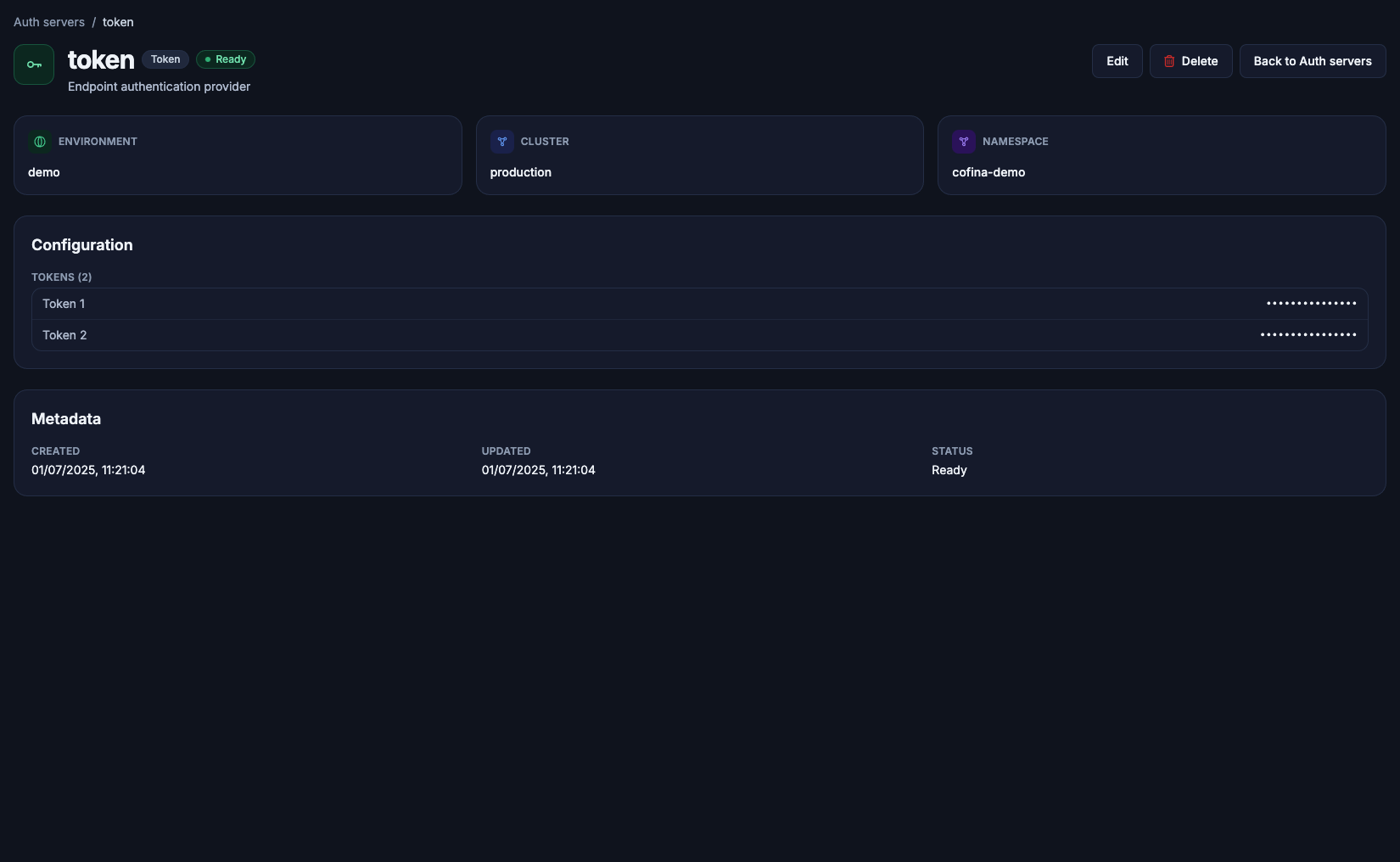
The token auth server named token, on the environment demo. The two tokens are masked. Created and Updated are shown with Status.
| Block | What it shows |
|---|---|
| Environment | The environment name |
| Cluster | The cluster that environment is on |
| Namespace | The Kubernetes namespace of that environment |
| Configuration | A token server lists Tokens ({n}) with each value masked. OIDC lists Issuer URL, Client ID, Client secret, Redirect path (/callback when unset), and Scopes. Basic lists Realm and Credentials ({n}) |
| Metadata | Created, Updated, and Status |
If the environment has been removed, the page says environment not found and offers Try again. The row can still appear in the list, with the environment identifier in the Environment column.
Edit
Edit opens the drawer titled Edit auth server. The environment line becomes An auth server's environment is fixed after creation. Project and Environment are locked. The identity line becomes The name can't change after creation. Name is locked. The provider type is locked: OIDC stays OIDC, basic stays basic, token stays token. The button is Save changes.
An empty name says Name is required. An empty environment, on create, says Environment is required. OIDC also uses Client secret is required unless empty secrets are allowed. Basic with no credential says Add at least one basic credential. Clearing the realm on edit says Basic realm must be preserved on update. A token server with no token says Add at least one API token.
Re-saving an OIDC secret sends the secret again, which is what the hint under Client secret says.
Delete
Delete opens Delete auth server. The body is: Are you sure you want to delete {name}? This action cannot be undone. Cancel closes it. Delete removes the auth server. While it runs, the button reads Deleting….
An endpoint that still points at a deleted auth server needs a new Auth server on its Security Policy, or authentication turned off.