What DKS is
DKS (Door Kubernetes Service) gives your organization a managed Kubernetes cluster for each create request. You choose the zone, Kubernetes version, worker size, and how the API is reached. Door runs the control plane. You run workloads with kubectl once you have a kubeconfig.
This page introduces the objects you will see, the three ways to manage clusters, the lifecycle phases, and the split between what you manage and what Door manages.
Who can do this: member can list and read clusters. super_admin can create, update, scale, and delete. See Authentication and organizations.
Concepts
| Concept | Meaning |
|---|---|
| Organization | Everything you do happens in one organization. Example: acme. |
| Zone | Where the cluster is provisioned. Today the catalog zone is abidjan. |
| Cluster | One managed Kubernetes cluster. Identified by a UUID after create. You choose the DNS name (example: payments-prod). |
| Node pool | A homogeneous group of worker nodes with one machine tier, a desired count, and optional autoscaling. A cluster always has at least one pool. |
| Node | One worker in a pool. The name matches what kubectl get nodes shows. |
| Machine tier | The machine type you pick on the Node Pools step (id such as dks.c5.xlarge). The catalog lists vCPU, RAM, and disk for each id. |
| Kubernetes version | You pick it at create (for example v1.32.4 from the catalog). It cannot be changed later. |
| Exposure mode | How you reach the Kubernetes API. Private: only from your network or VPN. Public: an HTTPS hostname under clusters.dks.door.africa. |
| Network mode | How application Elastic IPs are routed. Private (VPN) (default): private / VPN-reachable addresses. Internet: Internet-routed addresses. Immutable after create. Distinct from exposure (the API hostname). |
| Elastic IP | A named address you allocate on a Ready cluster for applications. Private or public, depending on the cluster's network mode and the zone. |
| Firewall rule | An ingress rule you open on worker nodes (protocol, port range, source CIDRs). Independent of Elastic IPs. |
The create wizard has no control-plane option.
The console may show whether the cluster is registered with the Door hub.
Organization (acme)
  └── Zone (abidjan)
        └── Cluster (payments-prod)
              ├── Node pools → nodes
              ├── Elastic IPs
              └── Firewall rules
        Exposure: public | private          (Kubernetes API)
        Network mode: intranet | internet   (application dataplane; set at create)
Examples in this set: organization acme, zone abidjan, cluster payments-prod, id 3f9c1a2e-7b4d-4c58-9e21-5d6f8a0b1c2d, pool workers, machine tier dks.c5.xlarge, Kubernetes v1.32.4.
Console, Maya, and kubectl
- Door console — sign in at https://door.cloud and open Clusters. + New Cluster is a three-step wizard. After create, the provisioning screen follows setup. A ready cluster has Overview, Nodes, Networking, Access & kubeconfig, and Settings.
- Maya — the assistant in the console. Ask in natural language. Maya pauses for your approval before it creates, scales, or deletes. After you approve, Maya reports the same step titles as the provisioning screen.
Scripts are for automation; see the API reference.
After you download a kubeconfig, kubectl (and any Kubernetes client) talks to your cluster, not to the DKS API. RBAC inside the cluster is yours. See Kubeconfig and kubectl.
Pick the channel that fits the task. The console is fastest for a first cluster. Maya is for conversational create/scale/delete with an approval step. Read-only Maya questions (list, catalog, status) do not need approval.
Cluster lifecycle
Create walks five setup steps. When they finish, the console shows Ready. Teardown is Deleting, then the cluster is gone. Setup can fail before the cluster is ready.
flowchart LR
  Requested --> Provisioning
  Provisioning --> ControlPlaneReady
  ControlPlaneReady --> NodesReady
  NodesReady --> Provisioned
  Requested -.-> Failed
  Provisioning -.-> Failed
  ControlPlaneReady -.-> Failed
  NodesReady -.-> Failed
  Provisioned --> Deleting
  Failed --> Deleting
Deleting --> Deleted| Phase | What it means | What you can do |
|---|---|---|
Requested | Door accepted the request. The provisioning screen shows Request received. | Watch the provisioning screen. Access and worker changes are not available yet. |
Provisioning | Door is checking the settings and creating infrastructure. The screen shows Validating configuration, then Creating infrastructure. | Wait. |
ControlPlaneReady | Control plane ready — Your Kubernetes API is online. You can download your kubeconfig while worker nodes finish joining. | Open Access & kubeconfig and connect. Nodes, Networking additions, and firewall rules wait until Ready. |
NodesReady | Worker nodes ready — workers have joined and Door is finishing health checks. | Keep waiting for Ready. Nodes, addresses, and firewall rules still wait. |
Provisioned | The console shows Ready. Your cluster is ready. All core components are healthy. | Everything is available: Access, Nodes, Networking, Settings, and firewall rules through automation. |
Failed | Setup did not finish. The message is written for you, never raw platform text. | Delete and recreate, or contact your Door account team with the cluster id. |
Deleting | Door is removing the cluster's resources. The row leaves the Clusters list. | Wait. |
Deleted | The cluster is gone. The name can be used again. | You may create payments-prod again. |
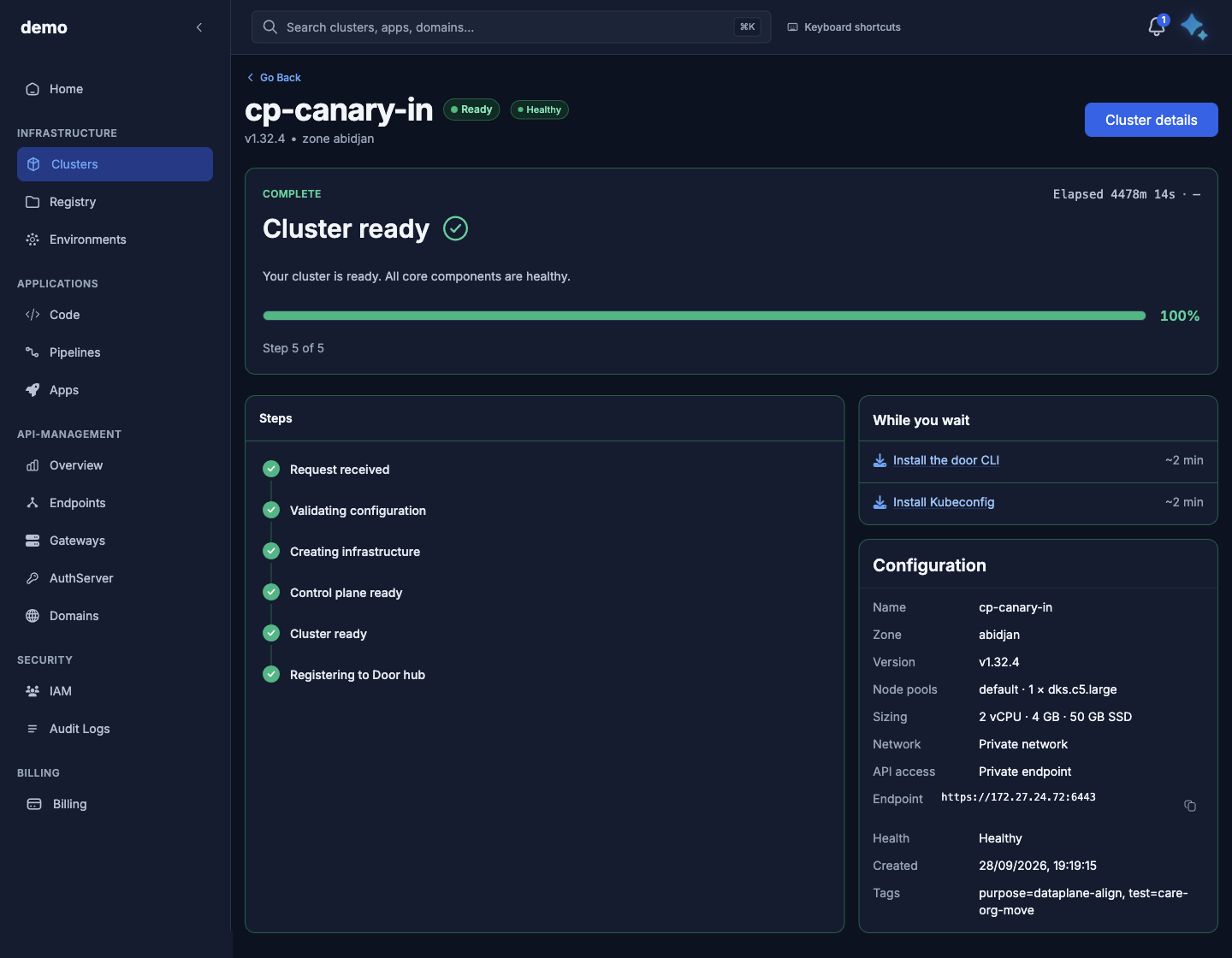
Provisioning screen in the demo organization.
What waits for Ready
Adding or scaling workers, adding an application address, opening a worker port, and the node list wait until the status is Ready. Access is the exception: you can connect from Control plane ready. You can delete a cluster in any phase, including Failed and while it is still being created. Adding workers does not change the Ready status; wait until the Nodes tab shows the new count. Scripts that need to wait are in the API reference. After the cluster is gone you may create payments-prod again.
What you manage vs what Door manages
| You manage | Door manages |
|---|---|
| Cluster name, description, and tags | The Kubernetes control plane. The create wizard has no control-plane option. |
| Node pools: machine type, count, autoscaling, pool labels/tags | Worker disk size. Disk size follows the catalog. |
| Exposure (Private / Public) and re-downloading kubeconfig after a change | Core cluster services that make the API and workers healthy |
| Elastic IPs and firewall rules on a Ready cluster | Zone catalog: versions, machine types, name/pool limits |
| Applications, Services, Ingress, and RBAC inside the cluster | Platform capacity and billing. A create can be refused when prepaid credit is insufficient — contact your Door account team. |
| kubectl access credentials (treat the kubeconfig as a secret) | Issuing the kubeconfig file for your cluster |
The wizard offers only the catalog machine types. There is no way to change the Kubernetes version after create.
Exposure vs Elastic IP vs firewall:
- Exposure is the Kubernetes API hostname (
kubectl). - Elastic IP is an address for your applications (a Service or Ingress you attach later).
- Firewall rule opens ports on workers regardless of whether you allocated an Elastic IP.
Deleting the cluster removes pools, Elastic IPs, and firewall rules with it.
Pricing, pager, and SLA numbers are not published here. Contact your Door account team.
Where to do it
| You want to… | In the console |
|---|---|
| Create a cluster and watch setup | + New Cluster, then the provisioning screen |
| Change tags or description, or delete | Settings |
| Change private or public API, download access | Access & kubeconfig |
| Add or scale workers | Nodes |
| Add an application address | Networking |
| Open a worker port | No console editor. Use the API reference |
Next
- Get a first cluster running (~15 minutes)
- Authenticate and pick an organization
- Read the catalog before you create
- Cluster create, read, progress, update, delete
- Node pools and nodes
- Kubeconfig and kubectl
- API server exposure
- Elastic IPs
- Firewall rules
- Maya AI assistant
- Errors and troubleshooting
- Limits and constraints
- API reference
The guide index and glossary are on Start here: Door Kubernetes Service.