Skip to content

Node pools and nodes

A node pool is a group of workers that share one machine tier. You add, scale, autoscale, and remove pools on a Provisioned cluster. You can also delete a single worker; Door replaces it so the pool's desired count stays the same.

Who can do this: member lists pools and nodes. super_admin adds, patches, removes pools, and deletes a node.

All mutations below return 409 unless phase=Provisioned (including ControlPlaneReady and NodesReady). A second pool operation on the same pool while one is still running is also 409. Different pools may be changed in parallel.

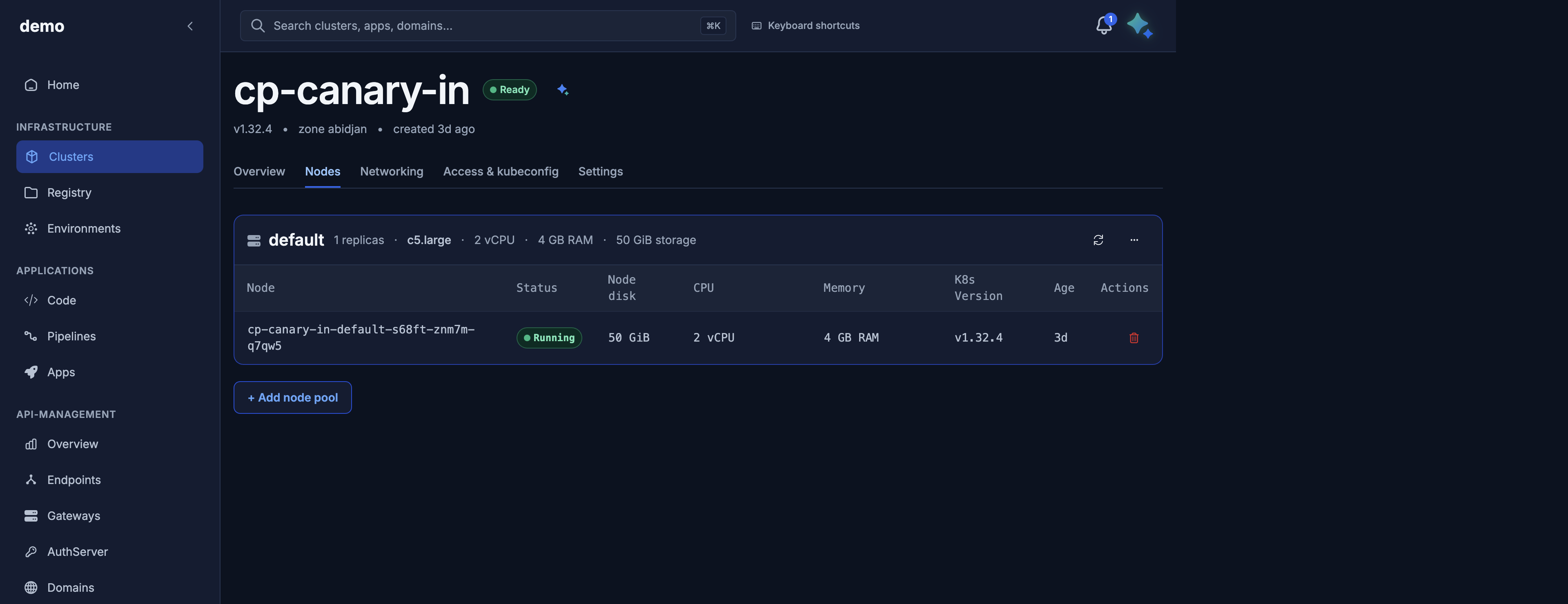
Console: cluster → Nodes (/dks/clusters/<id>/nodes). Maya: “Scale the workers pool on payments-prod to 4.” Approve.

List pools

GET /v1/public/clusters/{id}/node-pools → 200

curl -sS \
  "https://dks-api.apps.door.cloud/v1/public/clusters/${CLUSTER_ID}/node-pools" \
  -H "Authorization: Bearer $DOOR_TOKEN"
{
  "schema_version": "nodepool.public.v1",
  "cluster_id": "3f9c1a2e-7b4d-4c58-9e21-5d6f8a0b1c2d",
  "items": [
    {
      "id": "a1b2c3d4-0000-4000-8000-000000000001",
      "name": "workers",
      "size": "dks.c5.xlarge",
      "count": 2,
      "auto_scale": false,
      "min_nodes": null,
      "max_nodes": null,
      "labels": {},
      "tags": {},
      "root_volume_size_gib": 80,
      "lifecycle": "active"
    }
  ],
  "total": 1
}

GET /v1/public/clusters/{id} also embeds node_pools with the same item shape. Pool list does not embed nodes — use the node routes below.

lifecycle is active or deleting (after a pool delete is accepted, until it is gone).

Add a pool

POST /v1/public/clusters/{id}/node-pools → 202 and the full cluster body (updated node_pools).

PublicNodePoolCreateRequest

Field Type Default Constraints
name DNS label — required Unique among alive pools. Duplicate → 409.
size string — required Catalog machine tier id. Unknown → 400.
count int 1 0–200. count=0 only with auto_scale=true.
auto_scale bool false
min_nodes int or null null → 1 when autoscaling ≥ 0
max_nodes int or null null Required when auto_scale=true; ≥ min_nodes; count in range.
labels object {}
tags object {}

Same autoscaling rules as create. Invalid combination → 422. 402 if prepaid credit cannot cover the extra capacity.

curl -sS -X POST \
  "https://dks-api.apps.door.cloud/v1/public/clusters/${CLUSTER_ID}/node-pools" \
  -H "Authorization: Bearer $DOOR_TOKEN" \
  -H "Content-Type: application/json" \
  -d '{
    "name": "batch",
    "size": "dks.m5.xlarge",
    "count": 1
  }'

Follow with GET …/state (operations[] shows the pool activity while phase stays Provisioned).

Maya: “Add a node pool named batch on payments-prod with one dks.m5.xlarge.” Approve the confirmation card.

Scale and enable autoscaling

PATCH /v1/public/clusters/{id}/node-pools/{name} → 202 and the cluster body.

PublicNodePoolPatchRequest

Only mutable fields. size is not accepted (immutable). To change tier: add a new pool, wait until it is up, then delete the old one.

Field Type Notes
count int or omit 0–200
auto_scale bool or omit
min_nodes int or omit
max_nodes int or omit
labels object or omit Replaces the stored map when sent
tags object or omit Replaces the stored map when sent

Omitted keys keep the current row. Sending no fields → 422: at least one of: count, auto_scale, min_nodes, max_nodes, labels, tags.

The handler merges your patch with the current pool, then validates:

Rule Error
auto_scale=true and max_nodes missing (after merge) 422 max_nodes is required when auto_scale=true
min_nodes > max_nodes 422
count outside [min_nodes, max_nodes] when autoscaling 422
auto_scale=false and count=0 422 count=0 requires auto_scale=true (or use DELETE to remove the pool)

If you turn autoscaling on without sending bounds, Door fills min_nodes (default 1) and requires max_nodes from you or the existing row.

Optional Idempotency-Key behaves as on create (same key + same patch body replays 202).

# Fixed size: 2 → 4
curl -sS -X PATCH \
  "https://dks-api.apps.door.cloud/v1/public/clusters/${CLUSTER_ID}/node-pools/workers" \
  -H "Authorization: Bearer $DOOR_TOKEN" \
  -H "Content-Type: application/json" \
  -d '{ "count": 4 }'

# Turn on autoscaling
curl -sS -X PATCH \
  "https://dks-api.apps.door.cloud/v1/public/clusters/${CLUSTER_ID}/node-pools/workers" \
  -H "Authorization: Bearer $DOOR_TOKEN" \
  -H "Content-Type: application/json" \
  -d '{ "auto_scale": true, "min_nodes": 2, "max_nodes": 6, "count": 2 }'

409: cluster not Provisioned, or a pool operation still in flight. 404: unknown pool name (or already deleting). 402: credit gate.

Remove a pool

DELETE /v1/public/clusters/{id}/node-pools/{name} → 202.

The cluster must keep at least one alive pool. Deleting the last pool returns 409. Add a replacement pool first, then delete the old one.

curl -sS -X DELETE \
  "https://dks-api.apps.door.cloud/v1/public/clusters/${CLUSTER_ID}/node-pools/batch" \
  -H "Authorization: Bearer $DOOR_TOKEN"

The pool's lifecycle becomes deleting until workers are gone.

List nodes

Two reads, same stale-while-revalidate contract. Always 200 with the best-known snapshot (never 202). 409 cluster not ready yet until Provisioned. 404 if the pool name does not exist. 503 if inventory is temporarily unavailable.

Route Scope
GET /v1/public/clusters/{id}/nodes Every worker on the cluster
GET /v1/public/clusters/{id}/node-pools/{pool}/nodes One pool

Freshness fields on the envelope:

Field Meaning
cold true on the first read (no snapshot yet). items may be empty. A refresh is queued.
stale true when the snapshot is older than the cache TTL. A refresh is queued.
next_refresh_at When the background refresh is expected (if one was enqueued). Poll again after that.
curl -sS \
  "https://dks-api.apps.door.cloud/v1/public/clusters/${CLUSTER_ID}/nodes" \
  -H "Authorization: Bearer $DOOR_TOKEN"

curl -sS \
  "https://dks-api.apps.door.cloud/v1/public/clusters/${CLUSTER_ID}/node-pools/workers/nodes" \
  -H "Authorization: Bearer $DOOR_TOKEN"
{
  "schema_version": "node.public.v1",
  "cluster_id": "3f9c1a2e-7b4d-4c58-9e21-5d6f8a0b1c2d",
  "items": [
    {
      "name": "payments-prod-workers-abc12",
      "pool": "workers",
      "status": "Running",
      "kubernetes_version": "v1.32.4",
      "ready": true,
      "created_at": "2026-10-01T12:04:00Z",
      "deleted_at": null
    }
  ],
  "total": 2,
  "cold": false,
  "stale": false,
  "next_refresh_at": null
}

PublicNodeResponse

Field Meaning
name Worker name as in kubectl get nodes (falls back to the internal worker identity before the node joins).
pool Owning pool name, or null.
status Customer lifecycle: Pending, Provisioning, Provisioned, Running, Deleting, Deleted, Failed, Unknown.
kubernetes_version kubelet version when known.
ready Kubernetes Node Ready.
created_at / deleted_at

Addresses and provider ids are not exposed. Use kubectl if you need them on the node.

Delete a single node

DELETE /v1/public/clusters/{id}/nodes/{node_name} → 202 PublicNodeDeletePendingResponse.

The pool's declared count does not change. Door replaces the worker so the pool returns to the desired size. Use this to recycle one bad node, not to scale down (use PATCH count or autoscale for that).

node_name must match ^[a-z0-9][-a-z0-9.]{0,252}[a-z0-9]$ or you get 400. The API does not 404 on an unknown name; a bad name fails asynchronously — watch the node list.

409 if the cluster is not Provisioned or another delete for that node is already in flight.

curl -sS -X DELETE \
  "https://dks-api.apps.door.cloud/v1/public/clusters/${CLUSTER_ID}/nodes/payments-prod-workers-abc12" \
  -H "Authorization: Bearer $DOOR_TOKEN"
{
  "schema_version": "node.public.v1",
  "cluster_id": "3f9c1a2e-7b4d-4c58-9e21-5d6f8a0b1c2d",
  "node_name": "payments-prod-workers-abc12"
}

Poll GET …/nodes until the old name disappears and a replacement appears.

Maya: “Replace node payments-prod-workers-abc12 on payments-prod.”

Labels, tags, and root_volume_size_gib

Pool labels and tags are stored on the pool and returned by the API. They are not applied as Kubernetes node labels (workers are provisioned without extra node labels). To label nodes for scheduling, use kubectl label node (or a DaemonSet/admission policy) after the node is Ready.

root_volume_size_gib is not a request field. It is taken from the catalog tier's spec.disk_gib (for dks.c5.xlarge, 80 GiB). You cannot PATCH it. Changing disk means a new pool with a different size.

Cluster-level tags (string array on the cluster) are separate from pool tags (string maps).

Capacity totals

On GET cluster:

Field How it is computed
total_vcpu Sum of (tier vCPU × effective nodes) over alive pools. Null if a pool size cannot be resolved.
total_memory_gib Same for RAM.
total_volume_gib Sum of (root_volume_size_gib × effective nodes).
Effective nodes max_nodes when auto_scale is on and max_nodes is set; otherwise count.

Use these as planned capacity, not as a live kubectl top reading.

Status code cheat sheet

Code Typical cause
200 List pools or nodes.
202 Add/scale/remove pool or delete node accepted.
400 Unknown machine tier; invalid node name.
402 Prepaid credit cannot cover the scale.
403 Not super_admin (mutations) or not a member (reads).
404 Cluster, pool, or (after teardown) cluster gone.
409 Not Provisioned; last pool; name clash; operation in flight.
422 Empty PATCH; merged autoscaling bounds invalid.
503 Node inventory temporarily unavailable.