Skip to content

Kubeconfig and kubectl access

A kubeconfig is the credential file kubectl uses to call your cluster's Kubernetes API. DKS issues it; you store it like a secret. Role-based access inside the cluster (Roles, RoleBindings, service accounts) is yours to configure.

Who can do this: member or super_admin on the cluster's organization (default). Some environments require super_admin for download — if you get 403, ask your account team.

A static kubeconfig is a secret

The downloaded file carries cluster-admin credentials for this cluster. Anyone who holds it can administer the cluster. chmod 600 it, never commit it, never paste it into tickets or chat, and prefer the door CLI for day-to-day access. Re-downloading does not revoke an older copy.

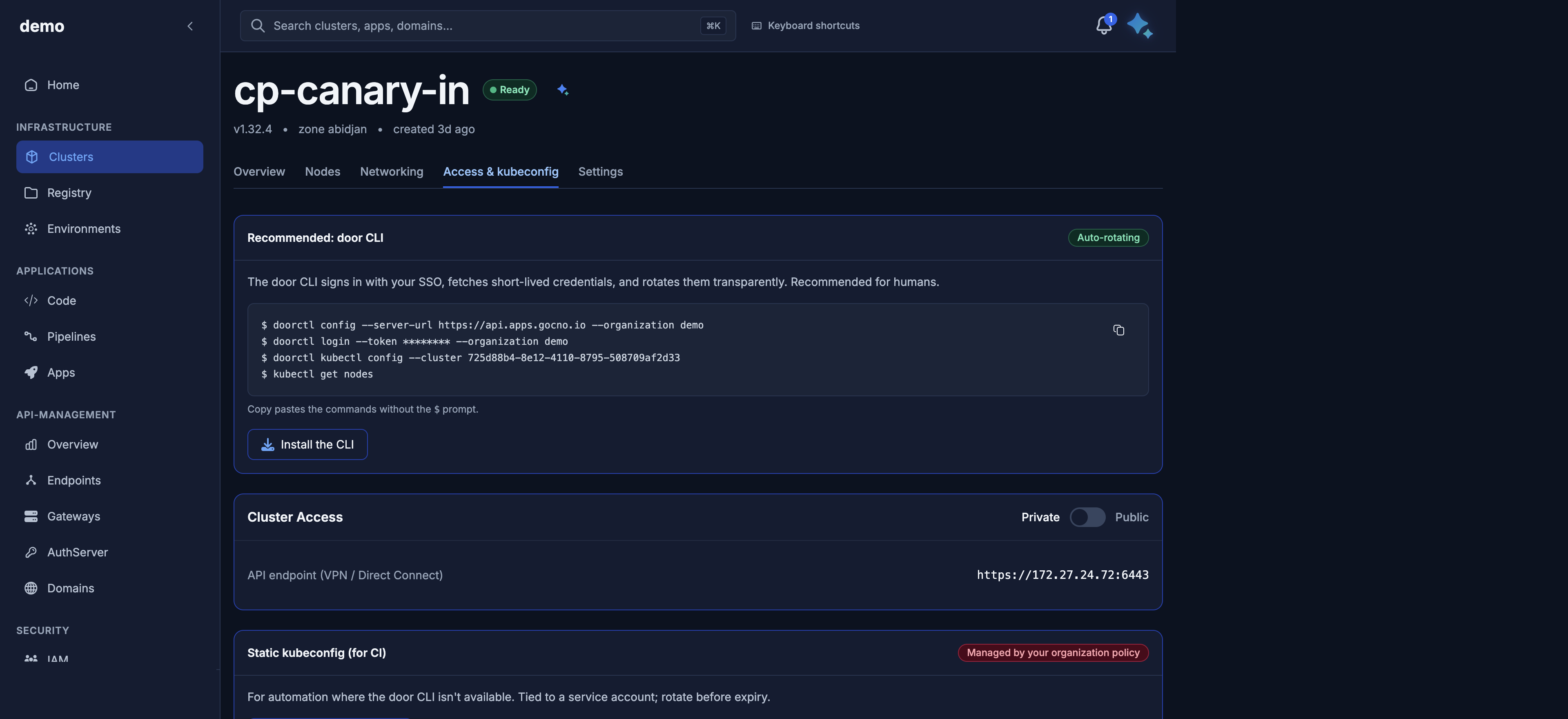
For day-to-day use, connect with the door CLI instead of a long-lived kubeconfig file. It signs in with your Door account, fetches short-lived credentials, and rotates them for you.

Install doorctl (curl, Homebrew, or a release binary): Install the door CLI.

doorctl config --server-url https://api.apps.gocno.io --organization acme
doorctl login
doorctl kubectl config --cluster <cluster-id>
kubectl get nodes

In the console this is the Access & kubeconfig tab, card Recommended: door CLI (badge Auto-rotating), with an Install the CLI button.

The same tab has Static kubeconfig (for CI) for automation where the CLI is not available. Your organization can turn that download off; the button then shows Managed by your organization policy. When it is off, use the CLI. When it is on, the file is tied to a service account — download it, store it like a secret, and rotate it before it expires by downloading again.

Download a static kubeconfig (API)

GET /v1/public/clusters/{id}/kubeconfig

The download is accepted when the cluster is in ControlPlaneReady or Provisioned. Any other phase (including NodesReady and Provisioning) returns 409.

Query Default Result
format=plain yes Raw YAML file, Content-Type: application/x-yaml, Content-Disposition: attachment; filename="<name>-kubeconfig.yaml".
format=json JSON envelope with the YAML in kubeconfig.
# File download (usual)
curl -sS -o payments-prod.kubeconfig \
  "https://dks-api.apps.door.cloud/v1/public/clusters/${CLUSTER_ID}/kubeconfig" \
  -H "Authorization: Bearer $DOOR_TOKEN"
chmod 600 payments-prod.kubeconfig
export KUBECONFIG="$PWD/payments-prod.kubeconfig"
# JSON (automation)
curl -sS \
  "https://dks-api.apps.door.cloud/v1/public/clusters/${CLUSTER_ID}/kubeconfig?format=json" \
  -H "Authorization: Bearer $DOOR_TOKEN"

200 vs 202

Status Meaning What you do
200 Fresh kubeconfig is cached. server: is already rewritten for the cluster's current exposure. Save the file and use kubectl.
202 Nothing fresh is cached. A fetch was queued. Wait Retry-After seconds and GET again.

202 JSON (format=json or when the pending body is returned):

{
  "schema_version": "kubeconfig.public.v1",
  "cluster_id": "3f9c1a2e-7b4d-4c58-9e21-5d6f8a0b1c2d",
  "message": "kubeconfig fetch requested",
  "retry_after_seconds": 5
}

The HTTP Retry-After header is the same integer (platform default 5 seconds). Repeat until 200. Do not treat 202 as failure.

while true; do
  CODE=$(curl -sS -D /tmp/dks-kc-headers -o payments-prod.kubeconfig -w '%{http_code}' \
    "https://dks-api.apps.door.cloud/v1/public/clusters/${CLUSTER_ID}/kubeconfig?format=plain" \
    -H "Authorization: Bearer $DOOR_TOKEN")
  [ "$CODE" = "200" ] && break
  if [ "$CODE" != "202" ]; then
    echo "kubeconfig HTTP $CODE"; exit 1
  fi
  WAIT=$(awk 'BEGIN{IGNORECASE=1} /^Retry-After:/{print $2}' /tmp/dks-kc-headers | tr -d '\r')
  sleep "${WAIT:-5}"
done
chmod 600 payments-prod.kubeconfig

200 JSON envelope:

Field Meaning
schema_version kubeconfig.public.v1
cluster_id UUID
cluster_name DNS name
kubeconfig Decrypted YAML, ready for kubectl
plaintext_size Bytes
fetched_at / received_at When the credential was fetched

Other codes: 401 token; 403 not allowed; 404 unknown cluster; 409 not yet ControlPlaneReady/Provisioned; 503 download not configured or the API URL cannot be resolved yet — retry shortly after the control plane comes up.

Console: Access & kubeconfig (/dks/clusters/<id>/access-kubeconfig). Maya: “Give me the kubeconfig for payments-prod” (dks_get_kubeconfig). Prefer the console or API so the secret does not land in a chat transcript.

server: URL: private vs public

DKS rewrites clusters[].cluster.server in the file it serves. You do not edit it by hand unless you know you must.

Public exposure (exposure_mode=public)

server: is an HTTPS hostname:

https://<cluster>-<org>-<hash>.clusters.dks.door.africa

Example shape: https://payments-p-acme-a1b2c3d4.clusters.dks.door.africa (cluster and org slugs are shortened; the hash is unique). The same value appears on the cluster as public_exposure_fqdn.

Consequence: you can run kubectl from the Internet (TLS on 443), subject to your network policy. This is the usual choice for laptops and CI.

Private exposure (exposure_mode=private)

server: is https://<address>:6443 on your private network. The same URL is private_api_server_endpoint on the cluster when the address exists.

Consequence: the API is reachable only from inside your network or VPN. From the public Internet, kubectl hangs or times out. That is expected — switch exposure to public or run kubectl from a jump host on the private network.

public_exposure_fqdn is null while private. private_api_server_endpoint is null while public (use the FQDN).

When to re-download

Re-download the kubeconfig when:

  1. You change exposure (PATCH /v1/public/clusters/{id}/exposure). The server: URL changes. An old file still points at the previous endpoint.
  2. The file is missing or you need a copy on another machine.
  3. A 202 poll just completed (200).
curl -sS -X PATCH \
  "https://dks-api.apps.door.cloud/v1/public/clusters/${CLUSTER_ID}/exposure" \
  -H "Authorization: Bearer $DOOR_TOKEN" \
  -H "Content-Type: application/json" \
  -d '{ "exposure_mode": "public" }'
# wait until GET cluster shows the new public_exposure_fqdn, then:
curl -sS -o payments-prod.kubeconfig \
  "https://dks-api.apps.door.cloud/v1/public/clusters/${CLUSTER_ID}/kubeconfig" \
  -H "Authorization: Bearer $DOOR_TOKEN"

Exposure change is 202. A transient 409 means a previous lifecycle change is still applying — retry the PATCH.

kubectl examples

export KUBECONFIG="$PWD/payments-prod.kubeconfig"

kubectl cluster-info
kubectl get nodes
kubectl get ns
kubectl get pods -A

To use several clusters in one shell, merge contexts by putting multiple files on KUBECONFIG (colon-separated) and copying the combined view:

export KUBECONFIG="$PWD/payments-prod.kubeconfig:$HOME/.kube/config"
kubectl config view --flatten > /tmp/merged.kubeconfig
export KUBECONFIG=/tmp/merged.kubeconfig
kubectl config get-contexts
kubectl config use-context payments-prod-admin@payments-prod

If get nodes hangs on a private cluster, you are not on the private network. If it fails with certificate or DNS errors after an exposure change, re-download.

Sample app (after Provisioned and kubectl get nodes shows Ready workers):

kubectl create deployment hello --image=nginx:1.27 --replicas=2
kubectl expose deployment hello --port=80 --type=ClusterIP

Handle credentials safely

  • Treat the kubeconfig as a cluster-admin secret. The served file uses a client certificate, context typically <cluster>-admin@<cluster>, user <cluster>-admin. Anyone with the file can administer this cluster.
  • chmod 600 the file. Do not commit it. Do not paste it into tickets or Maya.
  • There is no credential-rotation API on DKS. Re-downloading returns the current kubeconfig for the cluster; it does not mint a new identity or revoke the previous file. If a copy leaked, contact your Door account team and plan to replace the cluster if you need a hard cut-off.
  • Deleting the cluster invalidates access because the API goes away. Remove local copies yourself.

RBAC inside the cluster

The file Door gives you is for your cluster. Creating Role, ClusterRole, RoleBinding, ServiceAccount, and network policies is your responsibility. DKS does not expose a public route to manage in-cluster RBAC. Use kubectl (or GitOps) against the kubeconfig.

Least-privilege pattern: keep the Door-issued kubeconfig in a secure store; issue narrower service-account tokens for applications.

Console and Maya

Console: Access & kubeconfig tab — download, and toggle public/private exposure.

Maya: “Switch payments-prod to public exposure, then tell me when I should re-download kubeconfig.” Approve the exposure change. Prefer downloading the file from the console.

Next