Skip to content

API server exposure

Choose how you reach the Kubernetes API of a cluster: from your private network only (private), or over the public Internet (public). This page covers both modes, how to switch them, how to follow the change, and when to download a new kubeconfig.

Who can do this: member can read exposure_mode and public_exposure_fqdn. Switching exposure requires super_admin.

Exposure is the Kubernetes API hostname. It is not the same as Elastic IPs (application addresses) or network mode (intranet / internet).

What each mode means

Mode Who can reach the Kubernetes API Fields you see
private Only from your private network (VPN or Direct Connect). There is no Internet hostname. exposure_mode is private. public_exposure_fqdn is null. private_api_server_endpoint is https://<endpoint>:6443 once Door has allocated the private API address.
public Anyone on the Internet who can present a valid kubeconfig. Traffic is HTTPS on port 443. exposure_mode is public. public_exposure_fqdn is a DNS name. private_api_server_endpoint is null.

The public hostname is a single DNS label Door allocates:

https://<cluster>-<org>-<hash>.clusters.dks.door.africa

The first two segments are shortened slugs of the cluster name and organization (at most 10 characters each). The last segment is an 8-character hex suffix Door generates. You do not pick the label. The first time you enable public, Door allocates it and keeps the same hostname if you later switch back to private and then to public again.

Example for cluster payments-prod in organization acme:

https://payments-p-acme-0c84a254.clusters.dks.door.africa

On create, omit exposure_mode (or exposureMode) to use the platform default from GET /v1/catalog → defaults.exposure_mode. That default is currently public. Send private explicitly if the API must stay off the Internet.

Public exposure must be enabled for the zone. On Abidjan it is enabled. If it is not, a create or patch that asks for public returns 400.

Console

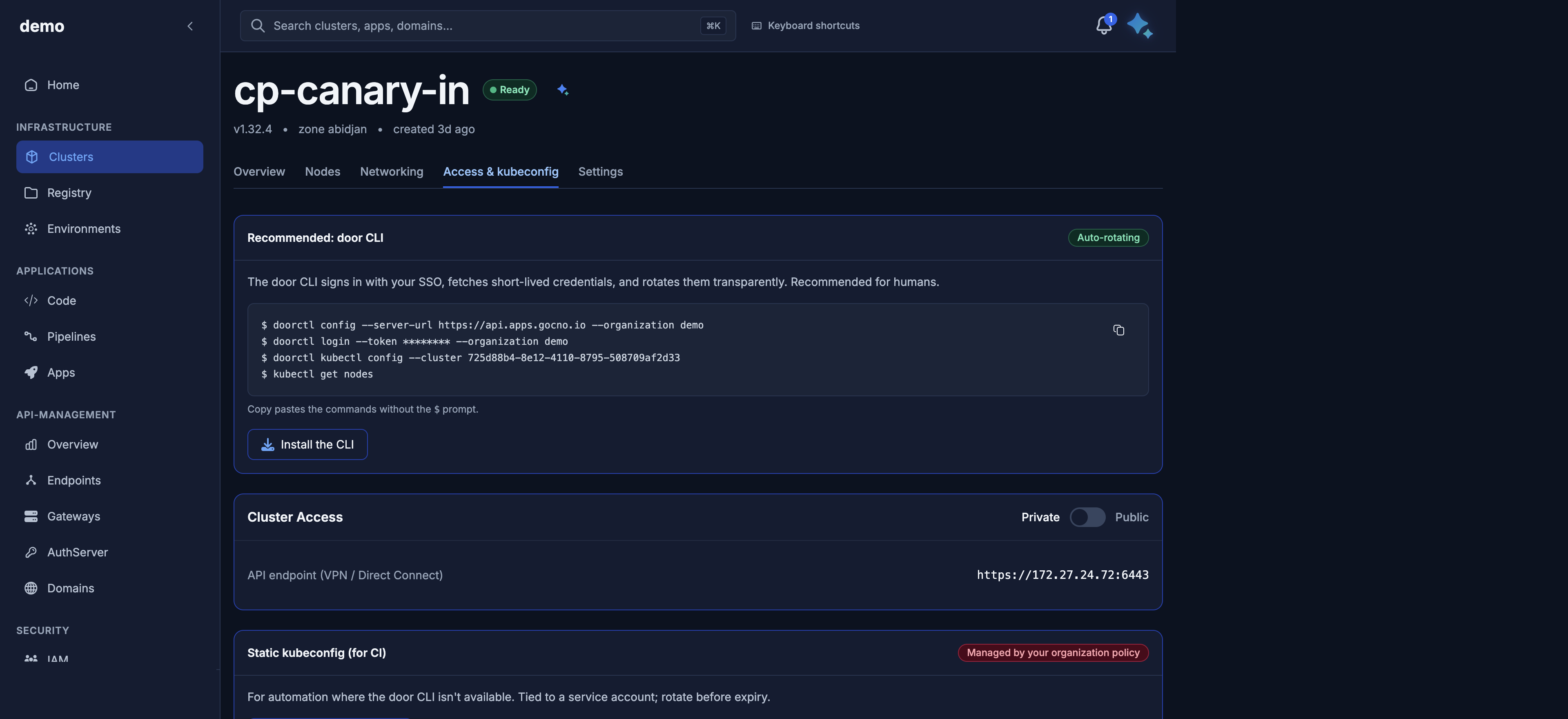
Private API endpoint on the Access tab

  1. Open https://door.cloud/dks/clusters and the cluster.
  2. Go to the Access & kubeconfig tab.
  3. Use the Private / Public control for the Kubernetes API.
  4. When the mode is public, copy the public URL. When it is private, use the private API endpoint shown on the page.
  5. After the change settles, download kubeconfig again (see below).

If the cluster is not Provisioned, the toggle is refused. Wait until the cluster is ready.

API

Set exposure with:

PATCH /v1/public/clusters/{id}/exposure

Body schema: PublicClusterExposurePatchRequest. Send either exposure_mode or exposureMode. Required. Values: public or private. Extra fields are rejected (422).

export DOOR_TOKEN
export CLUSTER_ID=3f9c1a2e-7b4d-4c58-9e21-5d6f8a0b1c2d
export ORG=acme

curl -sS -X PATCH \
  "https://dks-api.apps.door.cloud/v1/public/clusters/${CLUSTER_ID}/exposure" \
  -H "Authorization: Bearer $DOOR_TOKEN" \
  -H "X-Door-Organization: ${ORG}" \
  -H "Content-Type: application/json" \
  -d '{"exposure_mode":"public"}'

Success is 202 Accepted with a PublicClusterResponse. The body already shows the requested exposure_mode. For public, public_exposure_fqdn is filled once the DNS label exists (it is allocated on the first transition to public). The change is still being applied in the background.

{
  "schema_version": "cluster.public.v1",
  "id": "3f9c1a2e-7b4d-4c58-9e21-5d6f8a0b1c2d",
  "name": "payments-prod",
  "zone": "abidjan",
  "kubernetes_version": "v1.32.4",
  "phase": "Provisioned",
  "exposure_mode": "public",
  "public_exposure_fqdn": "payments-p-acme-0c84a254.clusters.dks.door.africa",
  "private_api_server_endpoint": null
}

If the cluster is already in the requested mode, the API returns 202 with the unchanged cluster and does not start a new change.

You can also set exposure_mode on create. After create, this PATCH is the only public way to flip it. Cluster name and network mode stay immutable.

Follow the change

202 means accepted, not finished. Follow it with either:

  1. Long-poll state (preferred while a change is in flight):
curl -sS \
  "https://dks-api.apps.door.cloud/v1/public/clusters/${CLUSTER_ID}/state?since=0&timeout_seconds=25" \
  -H "Authorization: Bearer $DOOR_TOKEN" \
  -H "X-Door-Organization: ${ORG}"

GET …/state returns PublicClusterStatusResponse and sets header X-State-Version. Pass that value as since on the next call. timeout_seconds is 0–60 (default 25). The operations array lists in-flight work (kind, phase, progress_pct). Wait until operations settle.

  1. Re-GET the cluster until the fields match what you asked for:
curl -sS \
  "https://dks-api.apps.door.cloud/v1/public/clusters/${CLUSTER_ID}" \
  -H "Authorization: Bearer $DOOR_TOKEN" \
  -H "X-Door-Organization: ${ORG}"

Done when:

  • phase is still Provisioned (an exposure change does not move the cluster out of Provisioned)
  • exposure_mode is the value you sent
  • for public: public_exposure_fqdn is a non-null hostname
  • for private: public_exposure_fqdn is null and private_api_server_endpoint is set

Status codes

Status When
202 Accepted. Follow with /state or re-GET.
400 Invalid mode; public exposure disabled for the zone; cluster is not Provisioned; cluster is deleting or already deleted.
401 Missing or invalid Bearer token.
403 Caller is not super_admin on the organization.
404 Unknown cluster id.
409 A previous change on this cluster is still being applied. Retry shortly with the same body.
422 Body failed schema validation (missing exposure_mode / exposureMode, or extra fields).

A cluster that is still Provisioning (or any phase other than Provisioned) is 400, not 409. Concurrent in-flight work is 409.

Error bodies use FastAPI's {"detail": "…"} shape (string detail for these codes).

Download kubeconfig again

The kubeconfig server: URL is rewritten when you download the file, from the cluster's current exposure:

  • private → private_api_server_endpoint (https://<endpoint>:6443)
  • public → https://<public_exposure_fqdn> (HTTPS on 443, no :6443)

After an exposure change finishes, download kubeconfig again and replace the local file. An old kubeconfig still points at the previous URL. See Kubeconfig and kubectl.

GET /v1/public/clusters/{id}/kubeconfig is allowed from ControlPlaneReady or Provisioned. Other phases return 409.

Maya

Ask, for example:

Switch the Kubernetes API of cluster payments-prod to private.

Maya acts with your role. A member cannot change exposure. When the console shows a confirmation card, review the description and approve or cancel before the change runs.

Security guidance

  • Use private when operators reach the API only from your private network or VPN. That is the smaller attack surface.
  • Use public when you need kubectl from the Internet. The endpoint is HTTPS. Anyone who obtains a kubeconfig can call the API, so treat the file as a secret.
  • Firewall rules open ports on worker nodes (application traffic). They do not filter the Kubernetes API. API reachability is this exposure setting only.
  • Restrict application traffic with firewall rules and, for Internet-facing apps, public Elastic IPs on a cluster whose network_mode is internet.
  • There is no customer-facing allowlist of source CIDRs for the Kubernetes API on this API. If you need a tighter API perimeter than private vs public, contact your Door account team.