Elastic IPs
An Elastic IP is a stable address for applications on a Provisioned cluster. It is not the Kubernetes API endpoint (that is API server exposure). Door allocates the address; you point workloads at it.
Who can do this: member can list and get Elastic IPs. Allocate and release require super_admin. The cluster must be Provisioned.
What you get
exposure | Reachability | address field |
|---|---|---|
private | Reachable from your private network (VPN or Direct Connect), not from the public Internet | The private address Door allocated |
public | Reachable from the Internet | The Internet-routed address (same value Door allocated on the public pool) |
Door chooses the address from the zone pool. You never send an IP in the request.
Which kind you can allocate is fixed by the cluster's immutable network_mode (set at create):
Cluster network_mode | Elastic IP exposure you can allocate |
|---|---|
intranet (catalog default) | private only |
internet | public only |
If you omit exposure on allocate, Door derives it from network_mode. If you send a value that does not match, the API returns 409.
public also requires the zone's public address pool to be enabled. On Abidjan it is. If the pool is missing or public Elastic IPs are disabled for the environment, allocate returns 503.
Status values
PublicElasticIpResponse.status is one of:
| Status | Meaning |
|---|---|
Pending | Door accepted the allocate (202). Work has not started applying yet. |
Provisioning | The address is being attached. |
Ready | You can use address. |
Failed | Allocate or release did not finish. Release is allowed from Failed. |
Deleting | Release accepted; the address is being returned to the pool. |
Deleted | Gone. GET then returns 404. |
Unknown values are projected as Unknown. The public body does not include a failure message for Elastic IPs; use status and Door support with the cluster id if a row stays Failed.
List and get
export DOOR_TOKEN
export CLUSTER_ID=3f9c1a2e-7b4d-4c58-9e21-5d6f8a0b1c2d
export ORG=acme
curl -sS \
"https://dks-api.apps.door.cloud/v1/public/clusters/${CLUSTER_ID}/elastic-ips" \
-H "Authorization: Bearer $DOOR_TOKEN" \
-H "X-Door-Organization: ${ORG}"
200 → PublicElasticIpListResponse:
{
"schema_version": "elastic_ip.public.v1",
"cluster_id": "3f9c1a2e-7b4d-4c58-9e21-5d6f8a0b1c2d",
"items": [
{
"schema_version": "elastic_ip.public.v1",
"id": "a1b2c3d4-1111-2222-3333-444455556666",
"cluster_id": "3f9c1a2e-7b4d-4c58-9e21-5d6f8a0b1c2d",
"name": "web",
"exposure": "private",
"address": "<allocated-address>",
"status": "Ready",
"created_at": "2026-10-01T10:23:14.123456Z",
"updated_at": "2026-10-01T10:24:01.000000Z",
"deleted_at": null
}
],
"total": 1
}
Get one: GET /v1/public/clusters/{id}/elastic-ips/{elastic_ip_id} → 200 PublicElasticIpResponse, or 404 if unknown or already released.
Allocate
Body: PublicElasticIpCreateRequest.
| Field | Required | Rules |
|---|---|---|
name | no | DNS label, 1–63 characters, ^[a-z0-9]([-a-z0-9]{0,61}[a-z0-9])?$. Unique among alive Elastic IPs on the cluster. |
exposure | no | private or public. Must match network_mode (see above). |
There is no release_policy on the public create body. Door applies its default.
curl -sS -X POST \
"https://dks-api.apps.door.cloud/v1/public/clusters/${CLUSTER_ID}/elastic-ips" \
-H "Authorization: Bearer $DOOR_TOKEN" \
-H "X-Door-Organization: ${ORG}" \
-H "Content-Type: application/json" \
-d '{"name":"web"}'
Success is 202 Accepted with a PublicElasticIpResponse (typically status: Pending and an address already filled). Poll GET the same id until Ready (or Failed).
Status codes (allocate)
| Status | When |
|---|---|
202 | Accepted. Poll until Ready. |
400 | Other service validation errors. |
401 | Missing or invalid token. |
403 | Not super_admin. |
404 | Cluster not found. |
409 | Cluster not Provisioned (or is deleting); name already used; exposure does not match network_mode. |
422 | Schema (bad name pattern, extra fields). |
503 | Product or public pool not available for the zone, or the pool is exhausted. Contact your Door account team. |
Release
Allowed only when status is Ready or Failed. Otherwise 409.
curl -sS -X DELETE \
"https://dks-api.apps.door.cloud/v1/public/clusters/${CLUSTER_ID}/elastic-ips/${EIP_ID}" \
-H "Authorization: Bearer $DOOR_TOKEN" \
-H "X-Door-Organization: ${ORG}"
202 with status: Deleting. Poll GET until 404 (terminal success).
How you use the address from Kubernetes
The public API does not expose a bind or unbind route. Binding is not a self-service field on PublicElasticIpResponse (no target Service, no extra address).
EIP-first (this API): allocate, wait until Ready, then create a Service of type LoadBalancer and annotate it with the Elastic IP name:
apiVersion: v1
kind: Service
metadata:
name: payments-web
annotations:
dks.door.africa/elastic-ip: web
spec:
type: LoadBalancer
selector:
app: payments-web
ports:
- port: 443
targetPort: 8443
Service-first: omit a pre-allocated IP and ask Door to allocate when the Service is created:
Door attaches the Service to the Elastic IP. Clients (browsers, APIs, VPN users) use the address from GET …/elastic-ips. Open the application ports with firewall rules (for example TCP 80 and 443 from your office CIDR or 0.0.0.0/0). Firewall rules are the public way to allow ingress to worker nodes; they are independent of Elastic IPs.
A Service without the annotation is not attached to a DKS Elastic IP.
Cluster delete
When you delete the cluster, Door releases its Elastic IPs with the cluster. You do not need to release each address first. If you want the address gone while the cluster stays, DELETE the Elastic IP as above.
Limits
There is no per-organization Elastic IP quota in the public API. The zone pool is finite: allocate returns 503 when it is exhausted. Contact your Door account team for capacity. Prepaid organizations can also receive 402 on other mutations when credit is insufficient; Elastic IP allocate itself maps pool problems to 503.
The public create body does not accept a count of IPs — one request allocates one address.
Console
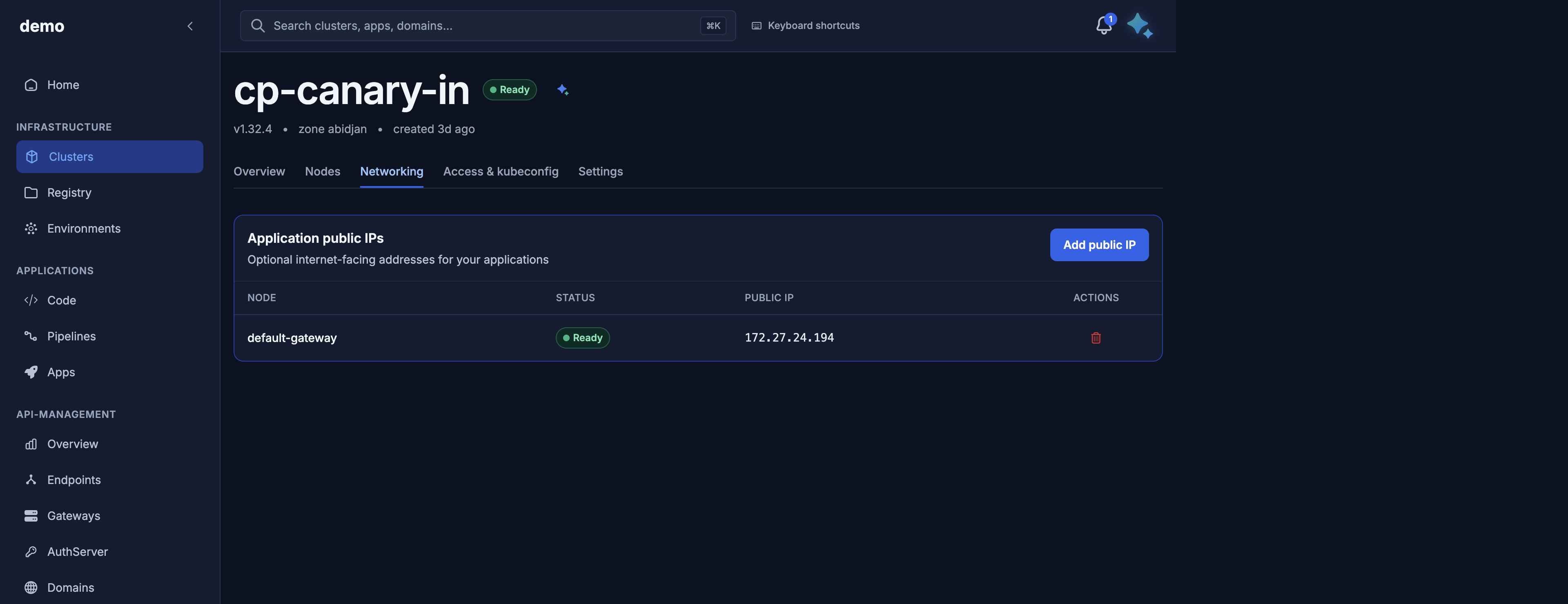
On the cluster, open the Networking tab.
- Card Application public IPs.
- Table: Node (name), Status, Public IP (
address). - Add public IP.
- Row Delete when
ReadyorFailed.
Empty state: No public IPs yet. Add one to expose a stable address for ingress.
Do not confuse this table with the Kubernetes API URL on Access & kubeconfig.
Firewall rules have no console form. Use the API.
Maya
You can ask Maya to list Elastic IPs on a cluster (name, status, address, exposure). Maya does not allocate or release them — use this API or the Networking tab for those mutations. There is no firewall tool in Maya; open ports with firewall rules.
Related
- Firewall rules — open ports toward the address
- API server exposure — Kubernetes API, not apps
- Limits
- API reference