Door console
Manage DKS clusters in the Door console at https://door.cloud/dks/clusters. Sign in with your Door account. The UI uses your session; you do not paste an API token.
Who can do this: member can open lists and detail (read). Create, scale, exposure, Elastic IPs, firewall, and delete require super_admin. A project admin counts as org member on DKS.
The console refreshes cluster status for you. Cluster detail URLs look like https://door.cloud/dks/clusters/<id>/…. Tabs: Overview, Nodes, Networking, Access & kubeconfig, Settings.
Clusters list
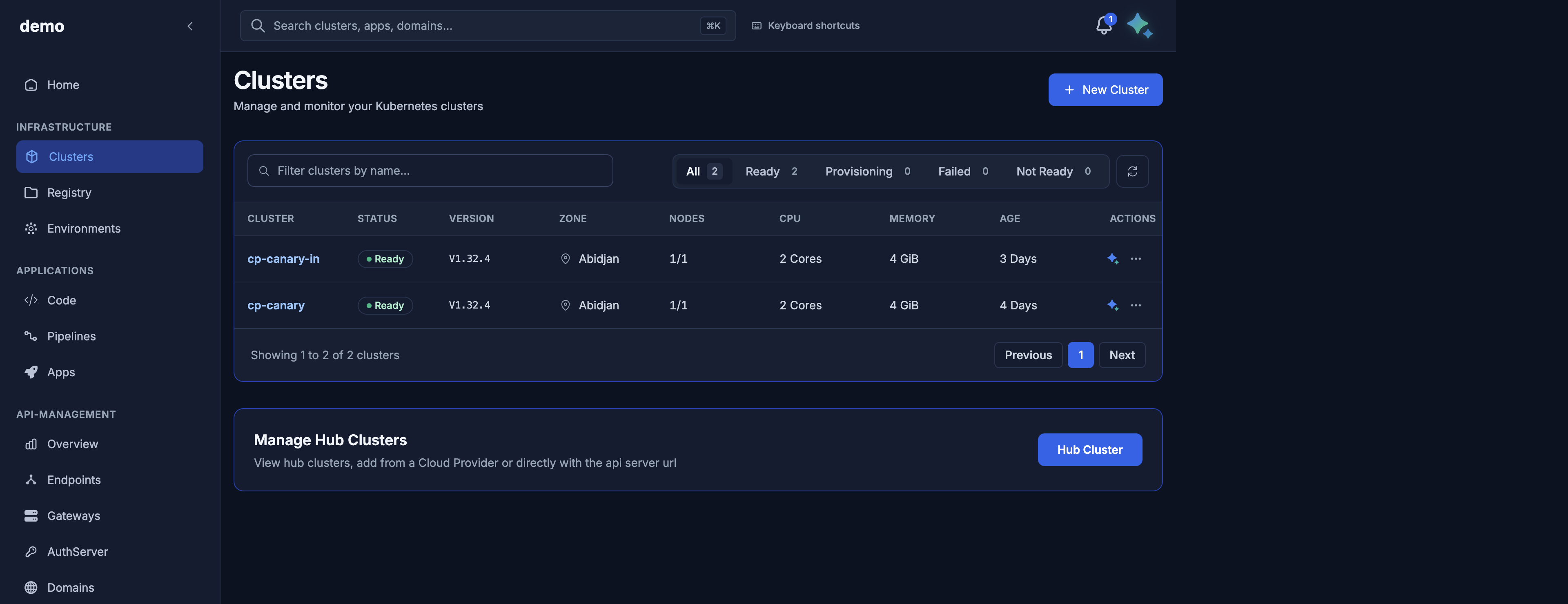
URL: https://door.cloud/dks/clusters
Shows
- Cluster name (link to overview)
- Status chip from the public phase (
Requested,Provisioning,ControlPlaneReady,NodesReadyoften grouped as provisioning;Provisionedoften labelled Ready;Failed;Deleting) - Kubernetes version, zone
- Node count from pool desired size (not always live Ready workers)
- Capacity totals (
total_vcpu,total_memory_gib) when present - Age from
created_at
Filter pills (All / Ready / Provisioning / Failed / Not Ready) are client-side on that mapped status. Confirmed from the console contract.
Actions
- Open a cluster (the name is a button)
- + New Cluster
- Refresh the list
- Per row: Analyze with Maya, and a … actions menu
The organization name is the heading at the top of the sidebar. Switch organization from the account menu at the bottom of the sidebar.
Maps to GET /v1/public/clusters in Cluster lifecycle.
Create cluster
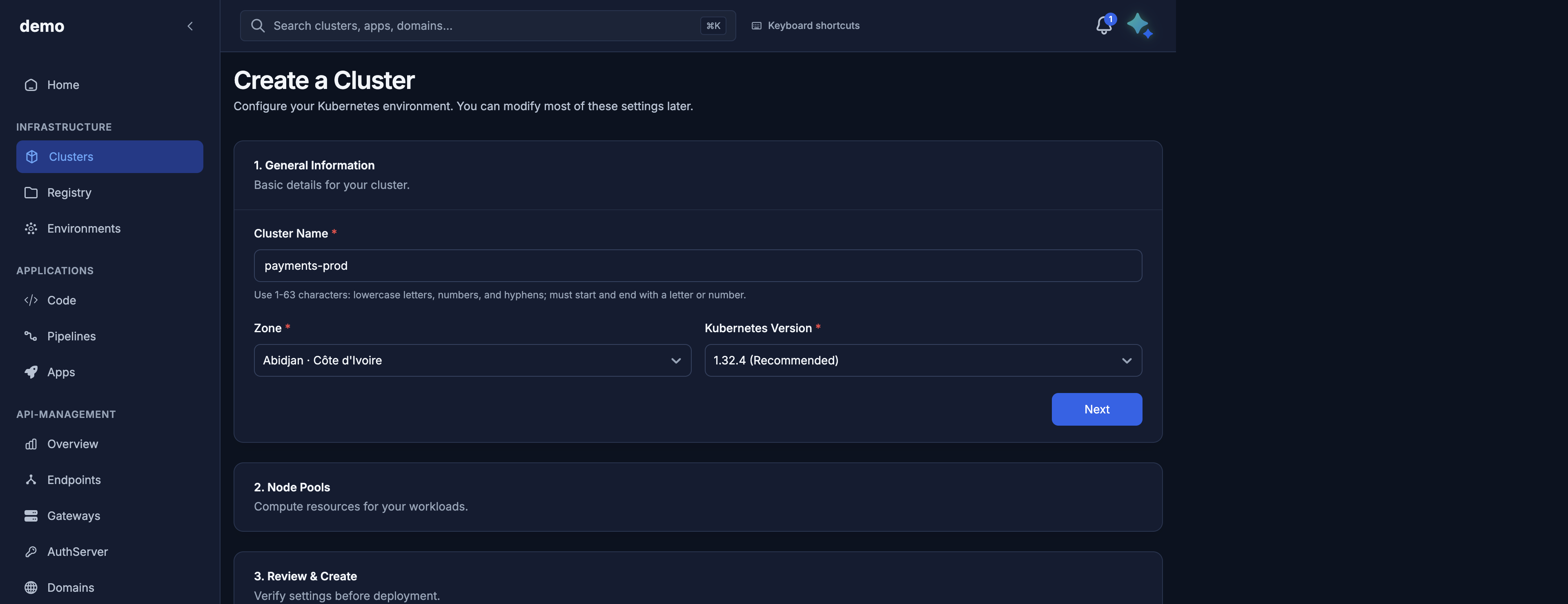
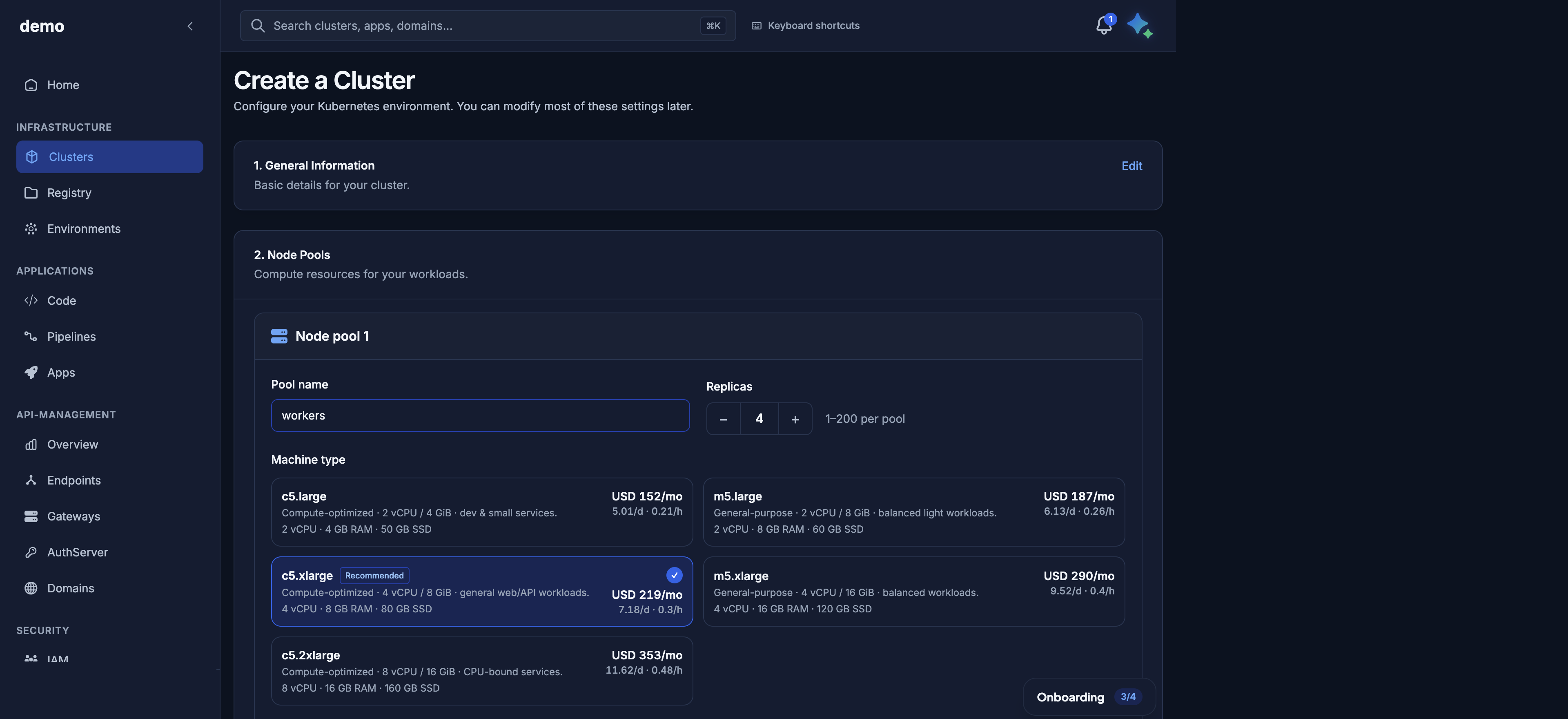
URL: https://door.cloud/dks/clusters/new
The wizard has three steps: 1. General Information (name, zone, Kubernetes version), 2. Node Pools (pool name, replicas 1–200, machine type cards with vCPU, memory, disk, and an estimated price), 3. Review & Create. Cancel leaves without creating anything.
Shows a form seeded from GET /v1/catalog?zone=abidjan:
- Cluster name (DNS label)
- Zone (today
abidjan) - Kubernetes version (catalog; Abidjan offers
v1.32.4) - Node pools: name, machine tier (for example
dks.c5.xlarge), count, optional autoscaling - Kubernetes API exposure: Private vs Public (see API server exposure)
- Where applications can be reached: toggle Private (VPN) vs Internet (maps to
network_modeintranet/internet). Confirmed card title: Where can your applications be reached? Set once; cannot be changed after creation. Required for public Elastic IPs (internetonly).
You do not pick a control plane. Door applies the one assigned to your organization (the zone default unless Door set another).
Actions: submit create. On success the console goes to the Provisioning page. Maps to POST /v1/public/clusters (201). Validation errors stay on the form (400 / 409 / 422 / 402 prepaid credit).
Provisioning
URL: https://door.cloud/dks/clusters/<id>/provisioning
Shows the five-step create narrative from the cluster progress block (render the API text as-is):
| Step | Label you should see |
|---|---|
| 1 | Request received |
| 2 | Validating configuration |
| 3 | Creating infrastructure |
| 4 | Control plane ready, then Worker nodes ready |
| 5 | Cluster ready |
Header badge uses public phase, not a raw internal step. Progress percent comes from progress.percent when set. On failure, the page shows failure_message.
Actions: wait; open Cluster details when the cluster is Provisioned (some builds also enable kubeconfig at Control plane ready). Maps to GET /v1/public/clusters/{id} and GET …/state.
Cluster detail shell
URL: https://door.cloud/dks/clusters/<id>/…
Header: name, status, id, version, zone, age. Tabs:
| Tab | Path suffix | Purpose |
|---|---|---|
| Overview | (index — no suffix) | Identity and capacity |
| Nodes | /nodes | Pools and workers |
| Networking | /networking | Application Elastic IPs |
| Access & kubeconfig | /access-kubeconfig | API URL and kubeconfig |
| Settings | /settings | Tags, description, delete |
While the cluster is still provisioning, the console may redirect to the Provisioning page.
Overview
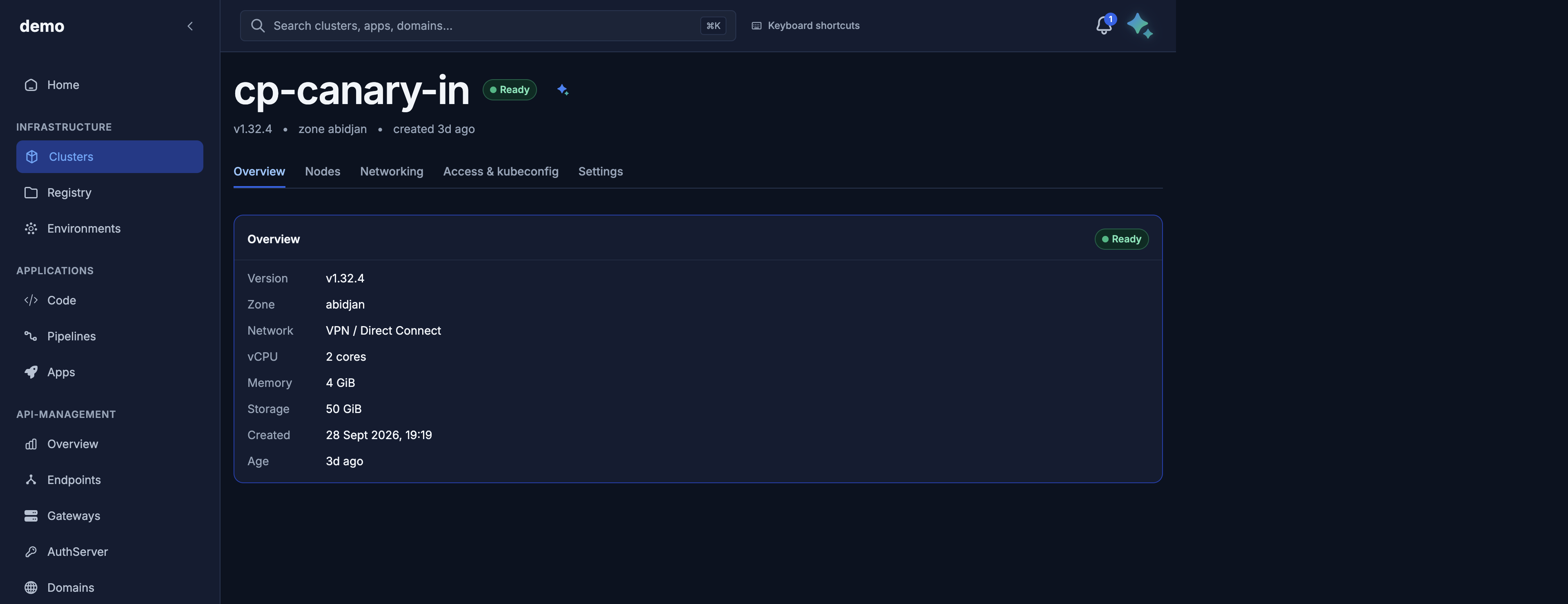
Shows: version, zone, network (VPN / Direct Connect when the cluster is intranet, otherwise Internet), vCPU, memory, storage, created time, and age. The header badge is Ready when the API phase is Provisioned.
The public API does not expose a control-plane "profile" field. If the console still shows a Profile row, treat it as informational.
Actions: none beyond navigation. Data from GET /v1/public/clusters/{id}.
Nodes
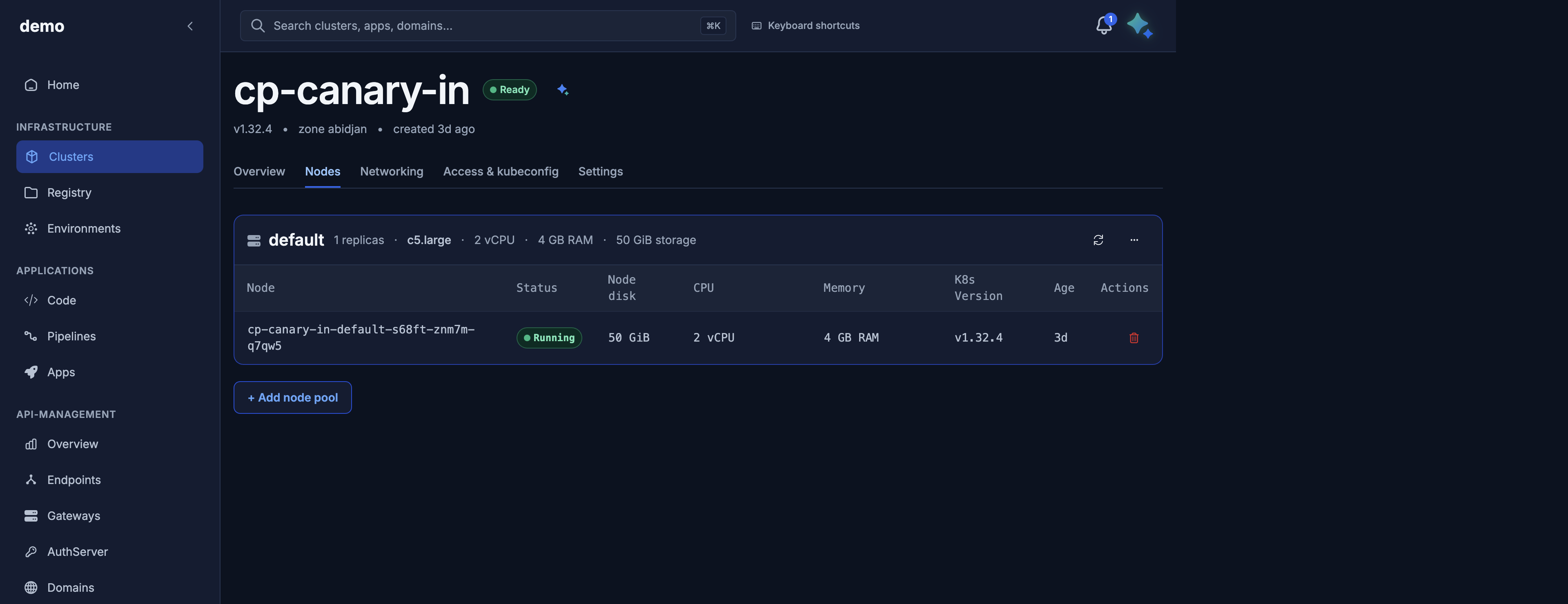
Shows: one card per node pool (name, replica count, machine type, vCPU, memory, disk) and a worker table (node name, status, disk, CPU, memory, Kubernetes version, age). + Add node pool adds a pool. The row action deletes that node.
Actions (super_admin, cluster Provisioned):
- Add pool → Node pools (
POST …/node-pools) - Scale / edit autoscaling →
PATCH …/node-pools/{name}(sizecannot change) - Delete pool (not the last pool) →
DELETE …/node-pools/{name} - Delete a node →
DELETE …/nodes/{node_name}(Door replaces capacity according to the pool)
Maps to public node-pool and node routes. List nodes is 200 with a snapshot; 409 until Provisioned.
Networking
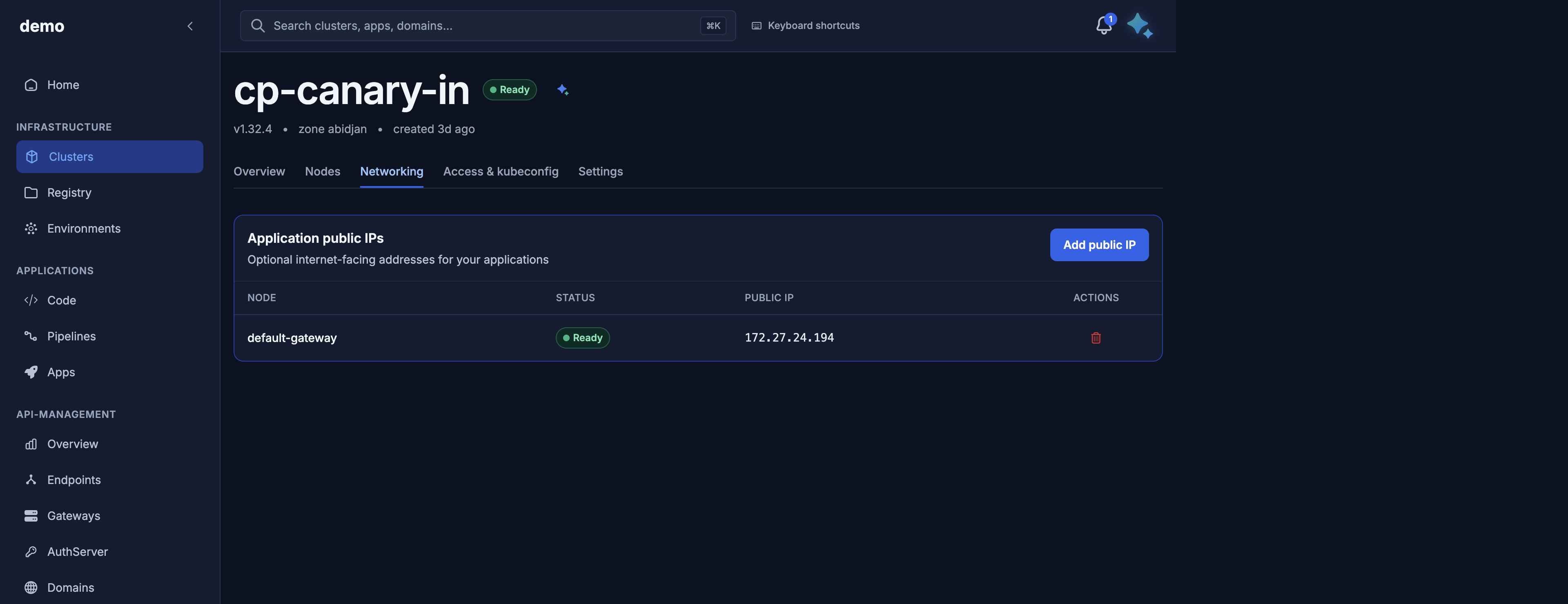
Confirmed in the Door console. One card:
- Title Application public IPs — Optional internet-facing addresses for your applications.
- Table columns: Node (the Elastic IP name), Status, Public IP (the
address), Actions. - Button Add public IP (shown when you can allocate).
- Row trash control (aria Delete \<name>) when release is allowed (
ReadyorFailed).
Empty copy: No public IPs yet. Add one to expose a stable address for ingress.
Maps to Elastic IPs. This tab does not show the Kubernetes API URL (that is Access) and does not include a firewall editor — use the firewall API.
Access & kubeconfig
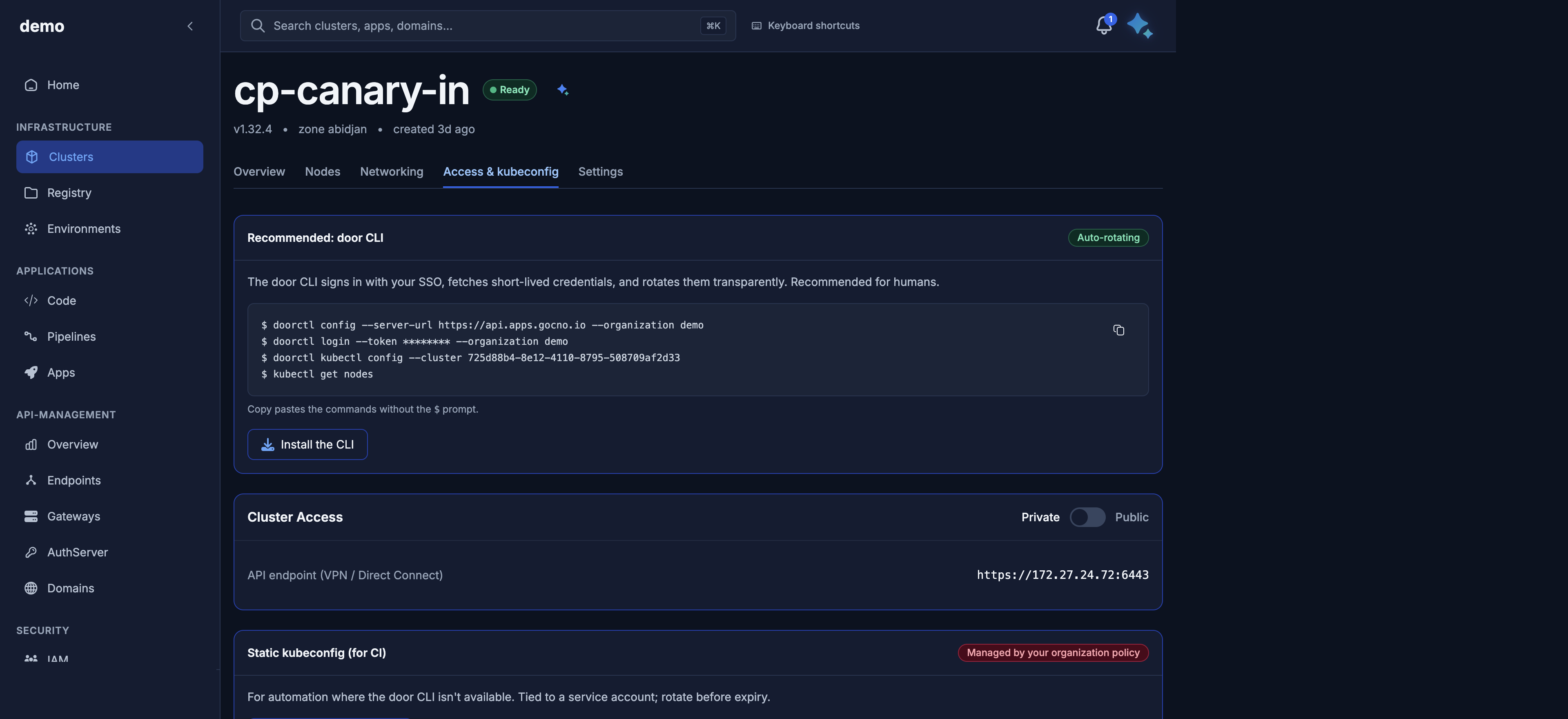
Shows:
- Recommended: door CLI — copy-paste commands (
doorctl config,doorctl login,doorctl kubectl config --cluster <id>,kubectl get nodes) and Install the CLI. Badge Auto-rotating. - Cluster Access — Private / Public toggle. Private shows API endpoint (VPN / Direct Connect). Public shows the public hostname.
- Static kubeconfig (for CI) — Download kubeconfig, unless your organization has disabled it (Managed by your organization policy).
Actions:
- Toggle exposure →
PATCH …/exposure(202). Wait until the URL matches, then download kubeconfig again. - Download kubeconfig →
GET …/kubeconfig(202then200). See Kubeconfig and kubectl.
Settings
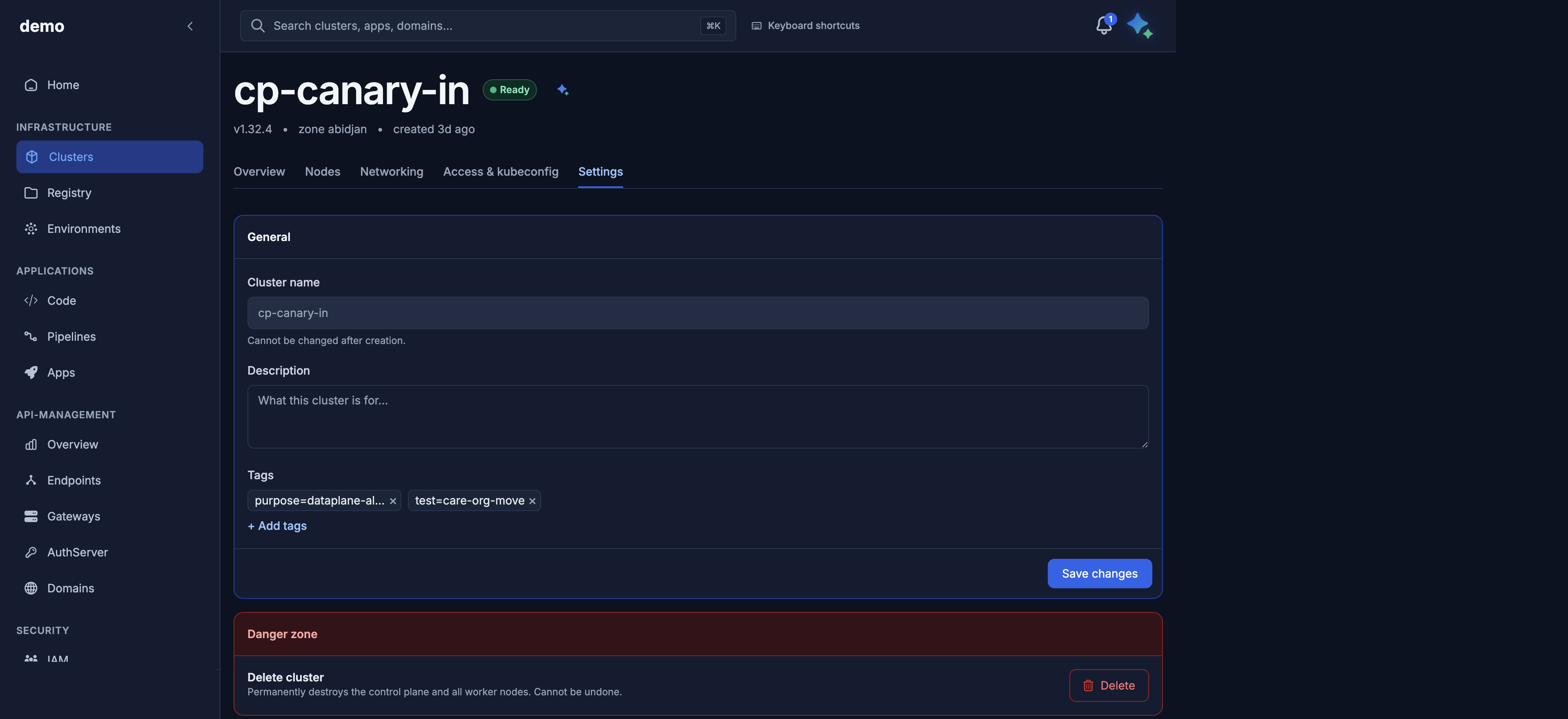
Shows:
- General card: cluster name (read-only), description, tags.
- Danger zone card: Delete cluster — Permanently destroys the control plane and all worker nodes. Cannot be undone. Button Delete opens a confirm dialog (force option when hub environments block the delete).
Actions:
- Save metadata →
PATCH /v1/public/clusters/{id}(tagsreplaces the full list;description: nullclears) - Delete cluster →
DELETE /v1/public/clusters/{id}(202, phaseDeleting). If Door hub environments still exist, the API returns409unless you confirm a forced delete (?force=true). Stay on the page untilDeletingrather than navigating away immediately.
Map to the API
| Console | API |
|---|---|
| List / create / provisioning / Overview | Cluster lifecycle |
| Nodes tab | Node pools and nodes |
| Access: kubeconfig download | Kubeconfig and kubectl |
| Access: Private / Public toggle | API server exposure |
| Networking: application IPs | Elastic IPs |
| Firewall rules (no console tab today) | Firewall rules |
| Settings: tags / description / delete | Cluster lifecycle |
Failed create: Overview/Provisioning show failure_message. Next step is errors or delete from Settings.
Maya from the same console
The assistant panel is Maya. It does not replace these pages; it calls the same public API with your role. See Maya AI assistant.