Skip to content

Catalog: zones, versions, and machine tiers

GET /v1/catalog is the product list for a zone: which Kubernetes versions you may request, which machine tier ids you send as node_pools[].size, and the name/pool limits the create form enforces.

Who can do this: member or super_admin on the resolved organization.

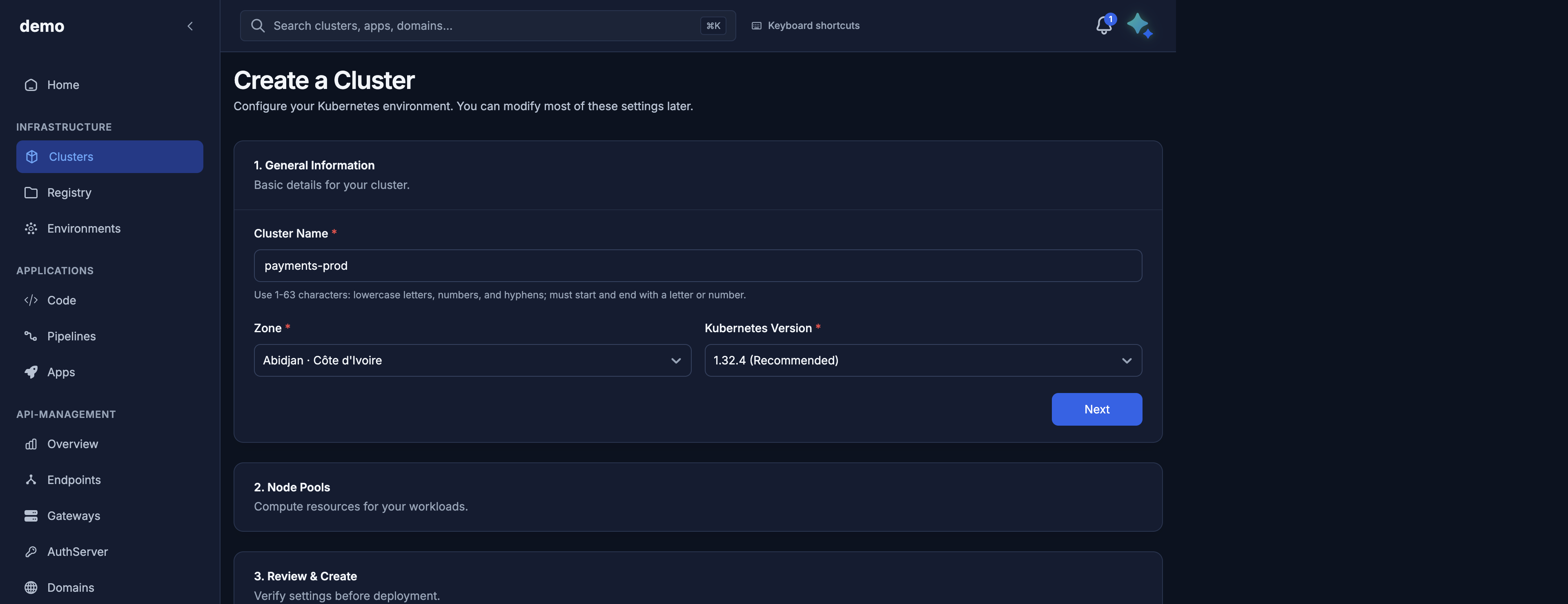
Always call the catalog (or use the console wizard, which calls it for you) before POST /v1/public/clusters. Unknown kubernetes_version or size values return 400.

Request

curl -sS "https://dks-api.apps.door.cloud/v1/catalog?zone=abidjan" \
  -H "Authorization: Bearer $DOOR_TOKEN" \
  -H "X-Door-Organization: acme"
Query Type Default Notes
zone string abidjan Unknown zone → 400 unknown zone='…'.

Organization uses the same resolution rules as other reads (?organization= → X-Door-Organization → preferred org). 401 / 403 / 400 behave as on cluster list.

Response shape

schema_version is catalog.public.v1. Extra provider fields (size backing names, images) are omitted on purpose.

zone

Field Type Abidjan today
id string abidjan
display_name string Abidjan
region_label string or null Côte d'Ivoire

kubernetes_versions[]

Sorted newest-first. Each item:

Field Type Meaning
id string Value you send as kubernetes_version (include the v).
label string Display label.
recommended boolean Preferred version for new clusters.
support_channel string or null For example stable.

Abidjan currently publishes:

id label recommended support_channel
v1.32.4 1.32.4 true stable

control_plane_options[] and active_control_plane_option_id

The catalog lists Door's control-plane offerings for the zone (id, display_name, description, recommended). active_control_plane_option_id is the zone default. Door may assign a different option to your organization. Ignore any other fields on these objects.

You do not pick a control plane on create. POST /v1/public/clusters has no control-plane field. Sending one is 422 (extra_forbidden). Treat these catalog fields as information, not as request parameters.

machine_tiers[]

Each tier:

Field Type Meaning
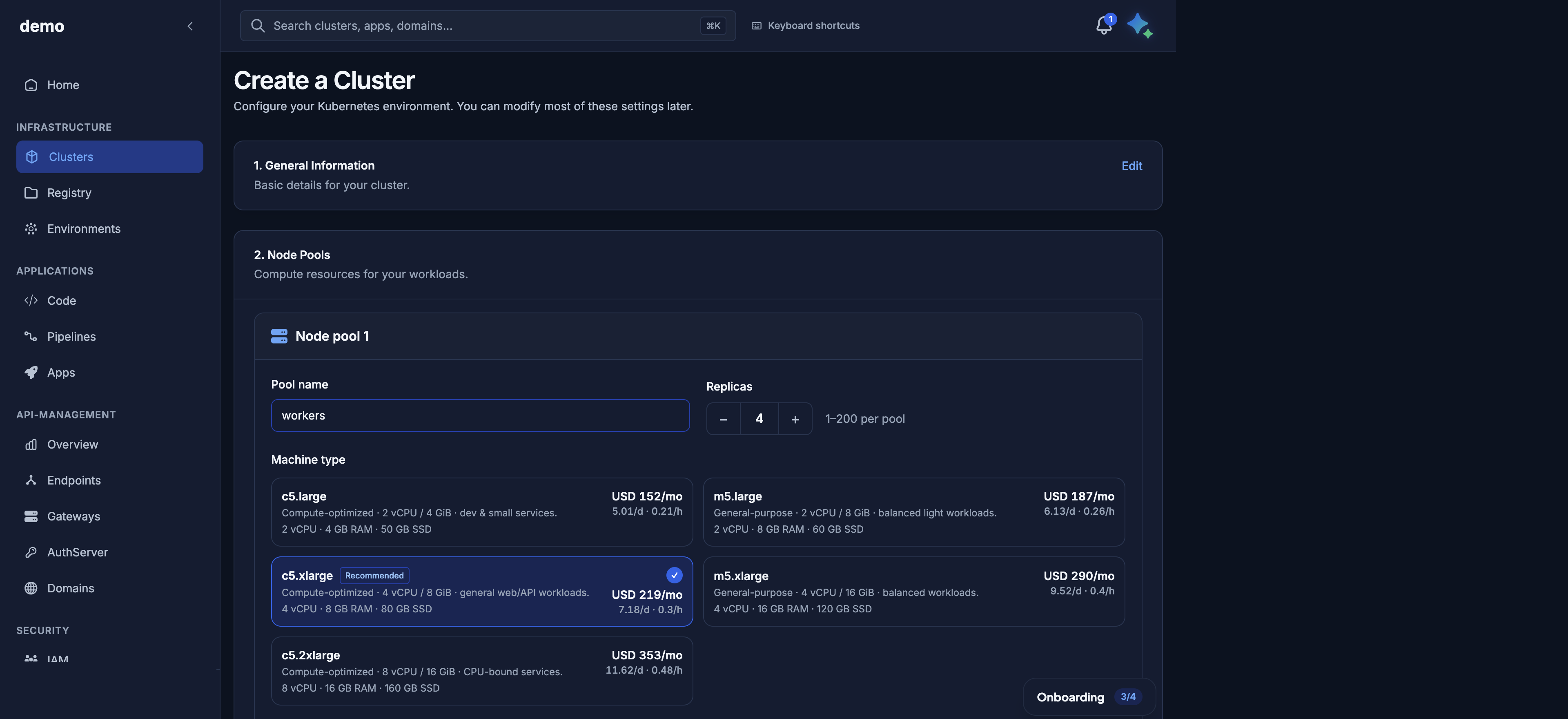
id string Value you send as node_pools[].size.
display_name string Short label in pickers.
description string or null Human summary.
spec.vcpu int vCPU per node.
spec.memory_gib int Memory (GiB) per node.
spec.disk_gib int Worker root disk (GiB). This becomes root_volume_size_gib on the pool.
recommended boolean Suggested default in the wizard.

Abidjan public tiers (disk is provisioned to match spec.disk_gib):

id Display vCPU RAM (GiB) Disk (GiB) Recommended
dks.c5.large c5.large 2 4 50 no
dks.m5.large m5.large 2 8 60 no
dks.c5.xlarge c5.xlarge 4 8 80 yes
dks.m5.xlarge m5.xlarge 4 16 120 no
dks.c5.2xlarge c5.2xlarge 8 16 160 no

c5 is compute-oriented (about 1 vCPU : 2 GiB). m5 is general-purpose (about 1 vCPU : 4 GiB). Use only these ids on the public API. A raw provider size is rejected with 400; the error lists public tier ids only.

constraints

Hardcoded on the catalog endpoint (same RFC1123 pattern as cluster and pool names in the request schema):

{
  "cluster_name": {
    "pattern": "^[a-z0-9]([-a-z0-9]{0,61}[a-z0-9])?$",
    "min_length": 1,
    "max_length": 63
  },
  "node_pools": {
    "min": 1,
    "max": 20,
    "min_nodes_per_pool": 1,
    "max_nodes_per_pool": 200
  }
}
Rule What it means
Cluster name Lowercase DNS label: a-z, 0-9, hyphens; no leading/trailing hyphen; 1–63 characters. Same rule for pool names, Elastic IP names, and cluster tags.
Pools per cluster At least 1, at most 20 (node_pools min_length/max_length on create).
Nodes per pool (form) Catalog publishes 1–200. The create/add schema allows count 0–200; count=0 is valid only with auto_scale=true (and then count must lie in [min_nodes, max_nodes]; omitted min_nodes defaults to 1).

A name that fails the pattern is 422. A cluster with zero pools is 422 (schema) or 400 (empty list after validation).

defaults

Server-chosen values used when you omit the field on create:

Field Current platform default Meaning
network_mode intranet Application Elastic IPs are private / VPN-reachable. internet is Internet-routed. Immutable after create.
exposure_mode public Kubernetes API hostname is Internet-reachable. private is VPN/network only. You can change exposure later.

These follow platform settings. Seed your form from the catalog rather than hardcoding.

copy

Optional string map (copy on the wire) for UI blurbs. Often empty. Render only if present.

pricing

Optional zone tariff card (zone_id, label, currency, hours_per_day, hours_per_month, items[] with id, label, unit, unit_price, optional day/month list prices). null when unpublished or unavailable. The rest of the catalog still succeeds. For commercial terms, contact your Door account team — do not assume list prices from an empty card.

How tiers map to node_pools[].size

On create and on add-pool, each pool must look like:

{
  "name": "workers",
  "size": "dks.c5.xlarge",
  "count": 2,
  "auto_scale": false
}

size is the catalog machine_tiers[].id. The cluster response echoes the same public id on node_pools[].size. You cannot change size with PATCH; add a new pool and delete the old one. See Node pools.

Worker capacity on the cluster (total_vcpu, total_memory_gib, total_volume_gib) is the sum over pools of (tier spec × effective node count). Autoscaling pools use max_nodes for that total.

Console and Maya

Console: /dks/clusters/new loads this catalog for zone, version, and size pickers.

Maya: “Show the Abidjan catalog: Kubernetes versions and machine tiers.” Then create with a real id from that list.

Example: full Abidjan-shaped body

{
  "schema_version": "catalog.public.v1",
  "zone": {
    "id": "abidjan",
    "display_name": "Abidjan",
    "region_label": "Côte d'Ivoire"
  },
  "kubernetes_versions": [
    {
      "id": "v1.32.4",
      "label": "1.32.4",
      "recommended": true,
      "support_channel": "stable"
    }
  ],
  "control_plane_options": [
    {
      "id": "production",
      "display_name": "Production",
      "description": "Suitable for critical and always-on applications.",
      "recommended": true
    },
    {
      "id": "development",
      "display_name": "Development",
      "description": "Lower cost, faster provisioning. Not for production.",
      "recommended": false
    }
  ],
  "active_control_plane_option_id": "development",
  "machine_tiers": [
    {
      "id": "dks.c5.large",
      "display_name": "c5.large",
      "description": "Compute-optimized · 2 vCPU / 4 GiB · dev & small services.",
      "spec": { "vcpu": 2, "memory_gib": 4, "disk_gib": 50 },
      "recommended": false
    },
    {
      "id": "dks.c5.xlarge",
      "display_name": "c5.xlarge",
      "description": "Compute-optimized · 4 vCPU / 8 GiB · general web/API workloads.",
      "spec": { "vcpu": 4, "memory_gib": 8, "disk_gib": 80 },
      "recommended": true
    }
  ],
  "constraints": {
    "cluster_name": {
      "pattern": "^[a-z0-9]([-a-z0-9]{0,61}[a-z0-9])?$",
      "min_length": 1,
      "max_length": 63
    },
    "node_pools": {
      "min": 1,
      "max": 20,
      "min_nodes_per_pool": 1,
      "max_nodes_per_pool": 200
    }
  },
  "defaults": {
    "network_mode": "intranet",
    "exposure_mode": "public"
  },
  "copy": {},
  "pricing": null
}

Do not copy control_plane_options into a cluster create body. The create wizard shows an estimated price next to each machine type; commercial terms still come from your Door account team when pricing is null.

Next